Globe SIM Registration Philippines 2026: (Official Link, Steps, Requirements)
Globe SIM registration is required to keep your mobile number active in the Philippines. If your SIM is not registered, calls, texts, and mobile data can stop working.
This guide shows the official Globe SIM registration link, clear steps, and the exact requirements you need. It also explains common problems like OTP not received, registration failed, and ID upload errors. This page is for Globe prepaid and postpaid users in the Philippines.
Official Globe SIM Registration Link
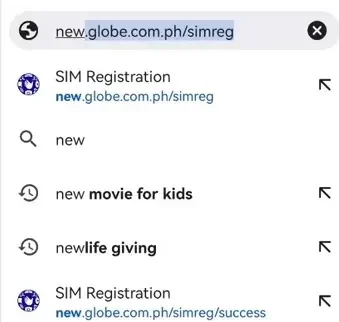
You can register your Globe SIM using the official Globe registration portal.
Official Globe SIM Registration Website: https://new.globe.com.ph/simreg
Only use the official Globe site. Avoid third-party links that ask for payments or personal details.
Globe SIM Registration Methods | Step-by-Step Guide
Globe, a major telecom company, has introduced multiple online and on-site platforms to facilitate the registration of SIMs for millions of customers. Globe’s efforts mirror similar initiatives by other telecom brands in the Philippines.
For example, TM SIM registration offers an easy online process for TM users to comply with the SIM Registration Act.
Globe SIM Registration Online Link
Follow these steps carefully. Most registration issues happen when one step is skipped or entered wrong.
To successfully register your Globe SIM, you need to provide the following:
- A valid government-issued ID (passport, driver’s license, or Other official documents).
- A clear selfie showing your face with the ID for verification.
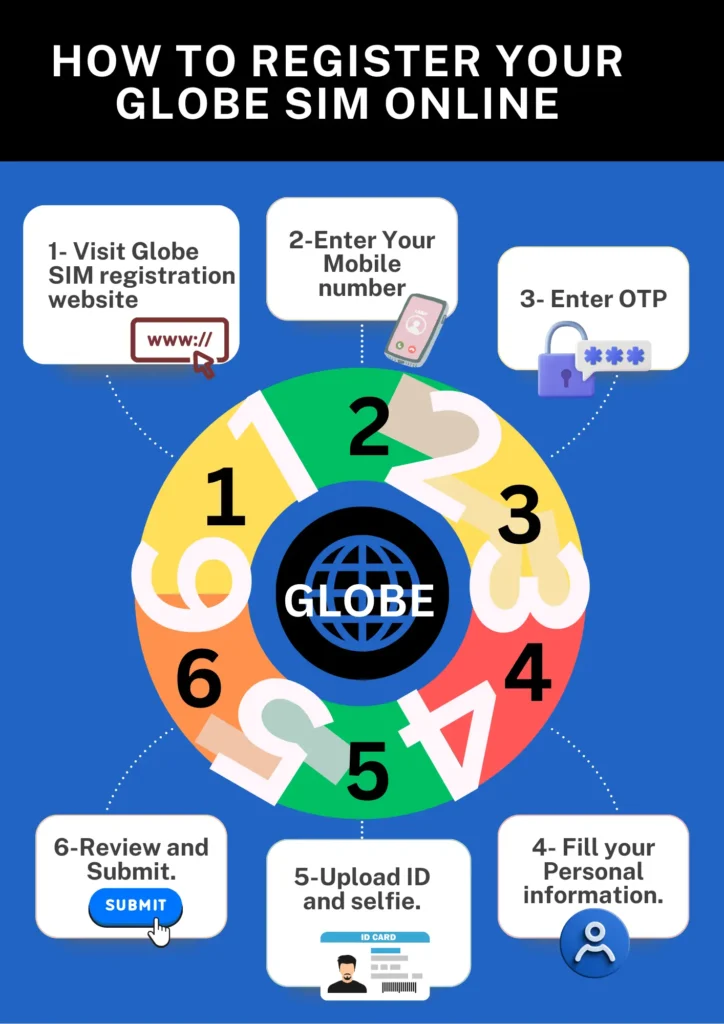
Here are step-by-step instructions on how to get Globe Sim registered.
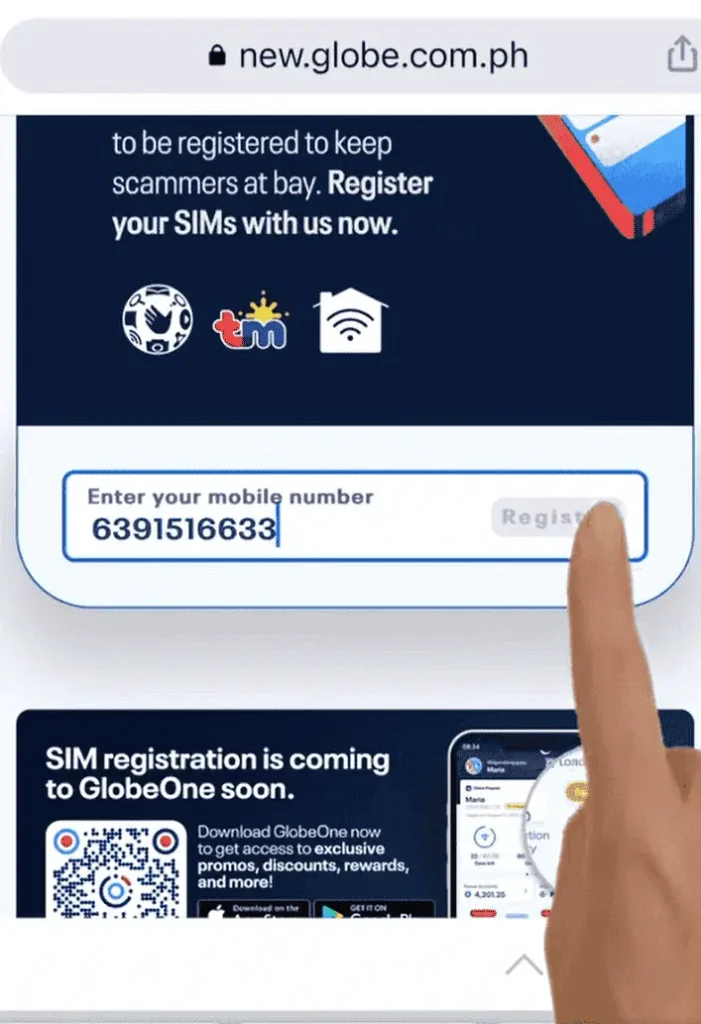
Step 1 – Enter Your Globe Mobile Number
- Visit the official website.
- Type your 10-digit Globe number (do not include +63).
- Make sure the SIM is inside your phone and has signal.
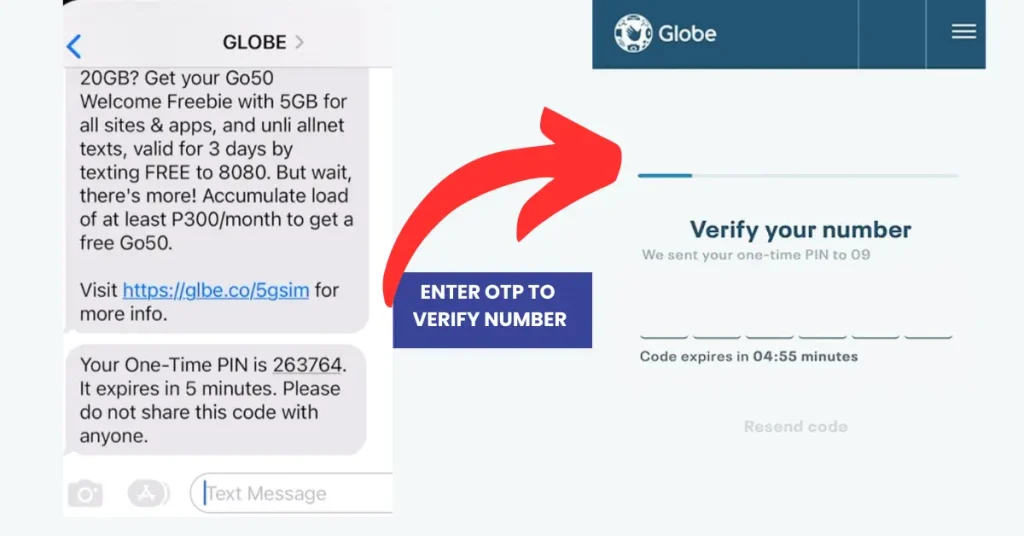
Step 2 – Receive and Enter OTP Code
Globe will send a one-time password (OTP) by text message.
- Enter the OTP within the time shown
- Do not refresh the page
- If it expires, request a new OTP
If you did not get the OTP, see the troubleshooting section below.
STEP#3– Fill Out the Registration Form
Enter your personal details exactly as shown on your ID:
- Full name
- Date of birth
- Address in the Philippines
Check spelling before moving to the next step.
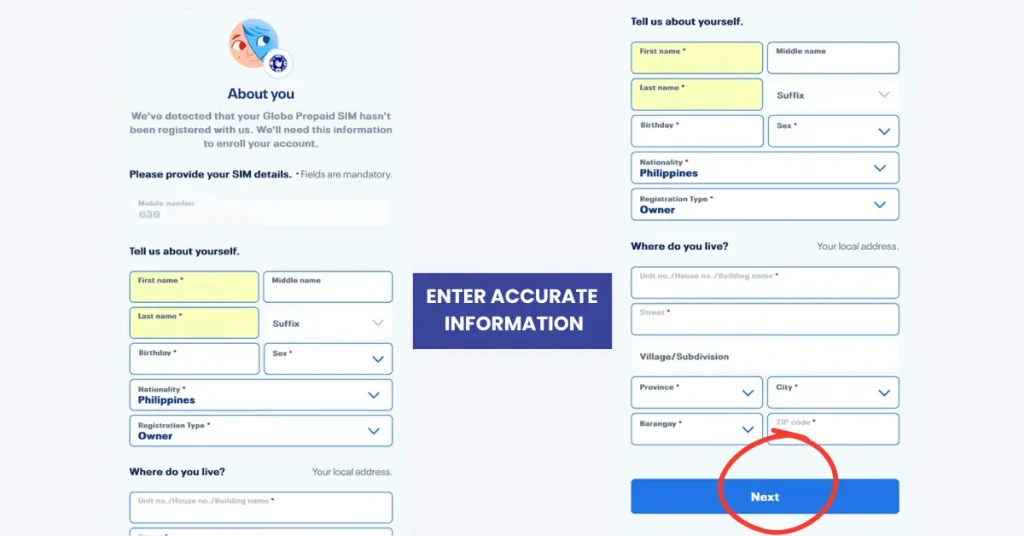
Step 4 – Upload Valid ID and Selfie
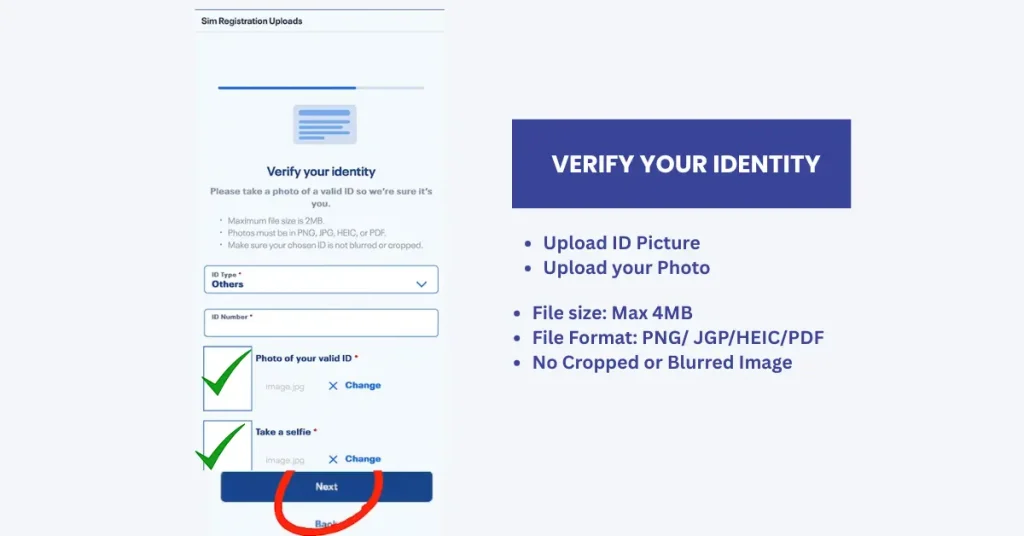
Upload:
- One valid government ID
- One clear selfie holding the same ID
Make sure:
- The photo is clear
- The text on the ID is readable
- The file size meets Globe’s rules
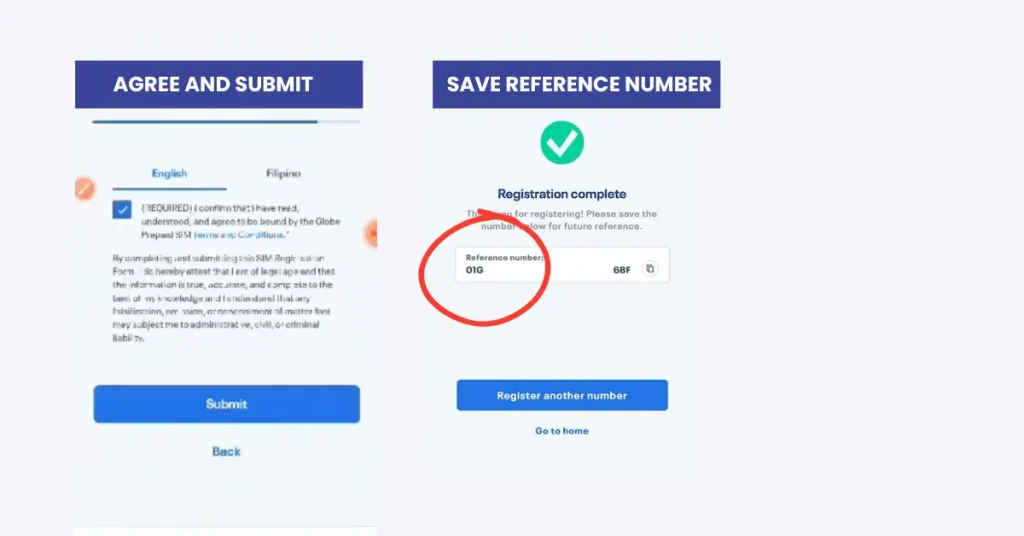
Step 5 – Submit and Save Confirmation
- After submitting, you should see a confirmation message.
- Save or screenshot the confirmation page. This is your proof of registration.
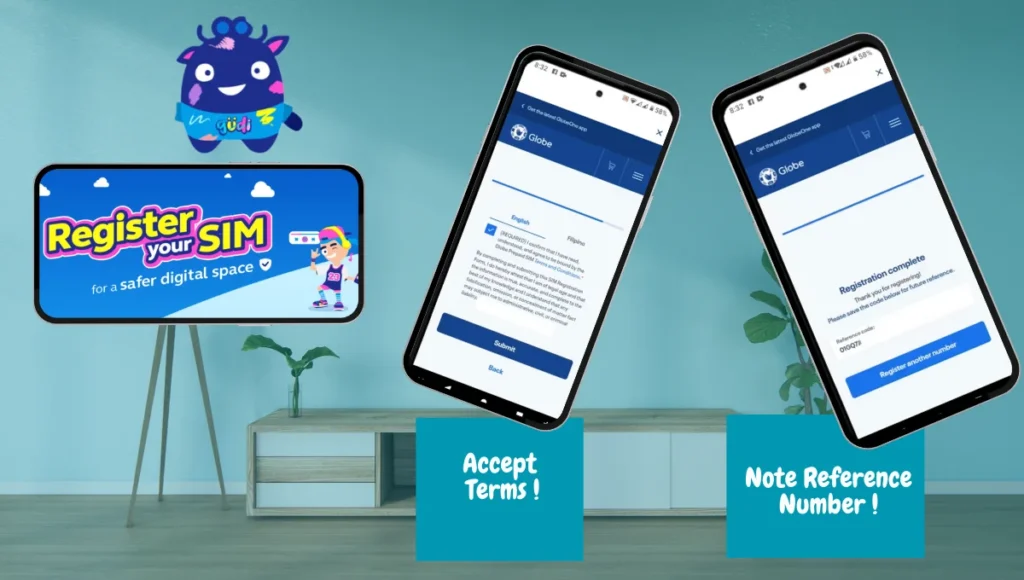
*****Upon clicking submit, a reference number will appear on the screen. Ensure that the reference number is noted as proof that your registration has been completed successfully. You may need it anytime in the future.
Read About:Globe Network Prefixes
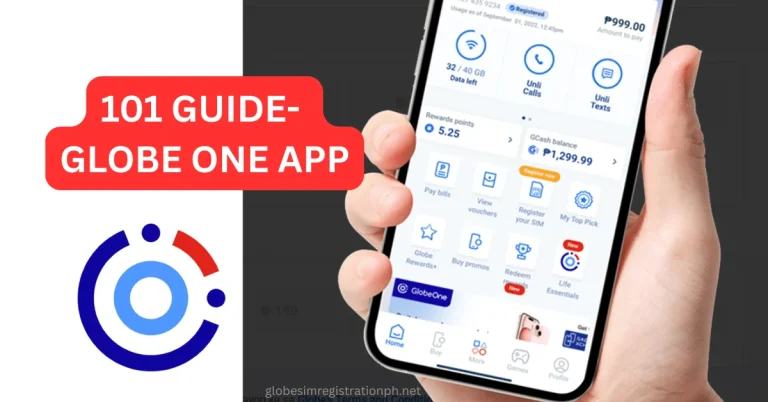
Registration via Globe One App
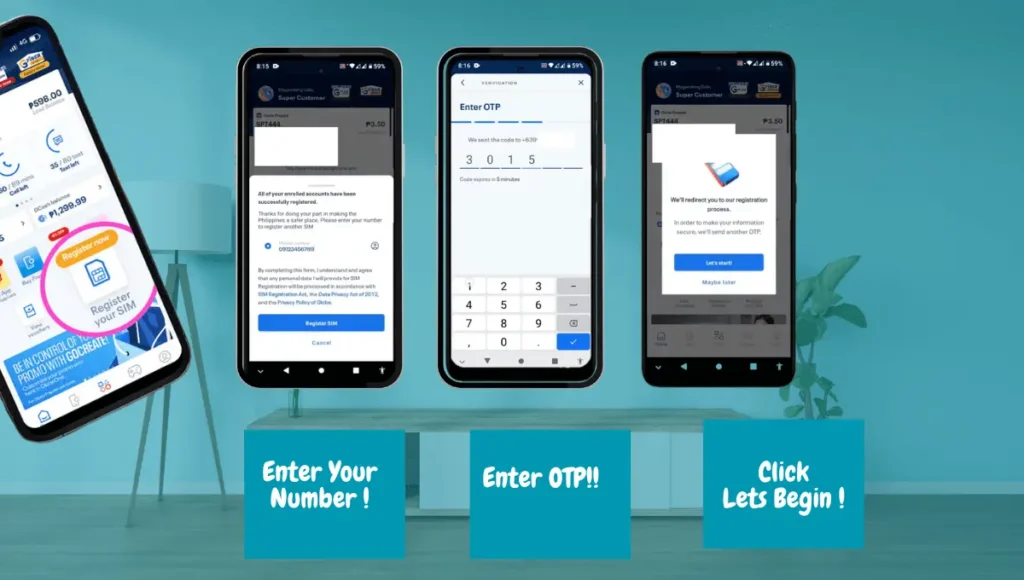
For SIM registration via Globe One app, Download Globe One App: Install App on your mobile via Google Play Store or App Store.
- Locate “Register Your SIM”: On the Home screen, you will see an Icon for “ Register your SIM. Click it.
- Select Your SIM type and enter your mobile number.
- You will receive OTP on the same number. Enter it and wait until it verifies your number.
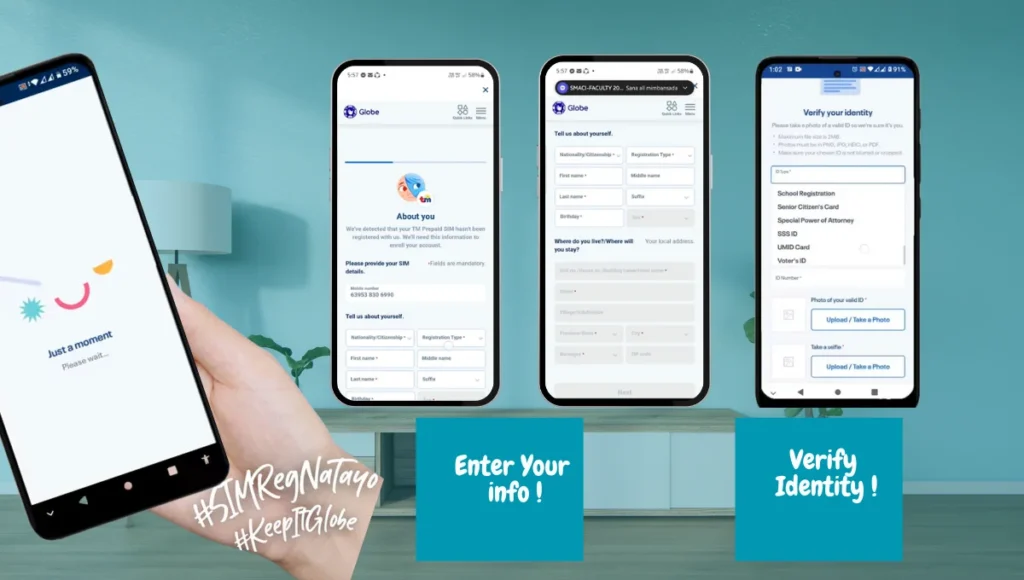
- After a few seconds, it will direct you to the next screen where you should enter your information (Name, Address, Date of birthday, Nationality, and Gender)
- Ensure you have entered accurate information.
- Click Next
- You will be directed to the next screen, where they will ask you to “verify Your Identity.”
- Select any one of the accepted IDs from the available options and enter the ID number.
- Upload your ID picture and take a clear selfie of yourself
- Upload your Selfie photo as well
- Image sizes should not exceed 4MB.
- Check the box and certify that you are of legal age and have entered accurate and true information to the best of your knowledge.
- Click submit, after a few seconds of processing the final message will pop up with a note that your registration request has been submitted.
- Globe may take 24 hours to validate all details and register the SIM card Globe.
Registering Globe SIM Via Gcash
Globe has introduced SIM registration via the “Gcash App” for fully-verified Gcash customers to streamline this requirement.
Registration is straightforward through Gcash App for verified users of this app.
- If you are fully-Verified Gcash User you will already have Gcash app installed in your phone, Or you can download it from Google Play store or App Store for IOS.
- Open Gcash App and if you are “unregistered” but fully-verified user , you will see prompt to Register your SIM.
- Follow the prompt and enter the required information and submit.
- By opting this method, you are authorizing Gcash App providers to forward your data to Globe Telecom.
- Globe Telecom will validate your information and you will receive confirmation in few days.
SIM Registration at Globe Stores
- Globe understands that some people may need assistance, so they’ve provided on-site help for hassle-free registration.
- 25 Easyhubs and 147 Globe stores across the country are available for in-person assistance.
- If you don’t have access to the internet or face technical issues, you can visit a Globe store to register your SIM.
- Required documents for in-store registration include: National ID, Driver’s License, IBP ID, NBI Clearance
- A Globe store representative will assist you in completing the registration process.
- Once the registration is complete, you will receive a confirmation code on your Globe SIM.
You can check the below link to find the nearest retail Globe store and get help with SIM registration.
Click Here: Complete List of Globe Stores
Globe eSIM-Registration with QR Code
Now you can do Globe SIM card registration by using a QR code.
Follow the below steps to quickly register your Globe eSIM.
- Access the QR Code:
- Obtain the registration QR code. QR code is usually available on official Globe website, or on Globe One app.
- If you opt for Globe eSIM, you should receive QR code in your email.
- Scan the QR Code:
- Open your phone’s camera or a QR code scanner app.
- Point the camera at the QR code to scan it.
- Open the Registration Page:
- Once scanned, the QR code will redirect you to Globe’s online SIM registration portal.
- Fill in the Required Information:
- Complete the registration form with your details, such as your name, address, and mobile number.
- Upload a valid government-issued ID as proof of identity.
- Review and submit the Registration form and wait for a confirmation message from Globe.
SIM Registration Methods Comparison Table
Here is a quick comparison for you to decide what is best method to register Globe SIM card.
| Registration Method | Ease of Use | Required Documents | Time to Complete | Best For |
|---|---|---|---|---|
| Online Portal | Easy | Valid ID, Selfie | 5-10 minutes | Prepaid/Postpaid users, Tech-savvy users |
| GlobeOne App | Easy | Valid ID, Selfie | 5-10 minutes | Smartphone users, App-savvy users |
| In-Store | Medium | Valid ID, Selfie, Proof of Address | 15-30 minutes | Users without internet, Minors/Guardians |
| SMS/USSD (If Available) | Very Easy | Phone Number | Immediate | Users with limited data access |
How to Register Globe SIM for Minors, Foreigners and Tourist
If you’re registering a SIM for a minor, the registration must be completed by a guardian. The minor’s birth certificate and the guardian’s valid ID are required.
Foreign nationals visiting the Philippines must also register their Globe SIM. They will need to show their passport and a proof of stay in the country (e.g., a tourist visa or hotel booking).
Staying 30 days or less?
- Register your SIM as a tourist.
- Show your passport, visa, and return ticket.
- SIM will expire after 30 day
Staying longer?
- Apply as a resident foreign national.
- Bring ACR I-Card or Alien Certificate.
- Include local address.
If you’re using a Globe Postpaid plan, Platinum account, or Globe@Home, the registration process is the same, but you may be asked to provide additional documents such as your account number or proof of service.
How to Check Your Globe SIM Registration Status | Verification Guide
Have you completed the registration process and are still determining how to do Globe SIM registartion verification? Or did you take the help of someone to do registration for you and want to verify if the SIM is registered? Once you have registered your SIM, you can check its registration status using one of the following methods:
1. Online Portal Check
Visit the Globe SIM Registration Portal to check the status of your registration. Simply log in and view your registration status.
2. GlobeOne App Status
The GlobeOne app also allows you to check if your SIM registration has been processed. Look for the registration status section on the app.
3. SMS/USSD
SMS/USSD status check for users with limited internet access.
You can check the status of your SIM registration via SMS or a USSD code. Simply send a specific keyword (e.g., “STATUS”) to the official Globe service number.
How to Edit or Update Your Registration Details
If you need to update/ edit or change your registration details, here’s how:
- Go to the Globe SIM Registration Portal or open the GlobeOne App.
- Log into your account.
- Choose the option to update your information (e.g., change of address, phone number).
- Upload any necessary documents (if required) and submit the changes.
When to update information:
Whether you are postpaid user or prepaid user, if any of below information is changed you need to update it in your registration detail.
- Address changed
- Name (last name) changed due to marriage or any other reason.
- Government-approved Identity card is updated.
Who Needs to Register Their Globe SIM?
All users of Globe Telecom must register their SIM cards, including:
- Prepaid SIM card users
- Postpaid subscribers
- Platinum account holders
- Globe@Home Wi-Fi users
- Foreign nationals and tourists
- Business users (corporate SIM registrations, including for employees)
- Minors and guardians: Special registration for minors with guardian involvement
- Registration is vital to prevent SIM card fraud and ensure that mobile networks remain secure.
What are Accepted ID and Information Need Before SIM Registration?
Globe Telecom accepts a wide range of IDs to make registration easier for different users. Make sure the ID you choose is valid and readable.
Primary Government IDs
- Passport
- Driver’s License (PRC or LTO)
- Unified Multi-Purpose ID (UMID)
- Social Security System (SSS) ID
- Government Service Insurance System (GSIS) ID
Secondary IDs (For Students, Seniors, and PWDs)
- School ID with valid expiration
- Senior Citizen ID
- PWD ID
- Postal ID
IDs Accepted for Foreigners and Tourists
- Passport with valid visa
- Alien Certificate of Registration (ACR I-Card)
- Work permit or relevant government-issued foreign ID
Before starting your Globe SIM registration, it’s important to have all the required items ready. Having everything prepared ensures your registration goes smoothly and avoids delays. Here’s what you need in 2026:
- Active Globe or TM SIM card: The SIM you want to register must be active and inserted in your mobile phone.
- Stable internet connection: Registration is online, so a reliable internet connection helps avoid errors or verification delays.
- Valid government-issued ID: Make sure your ID is readable and matches your personal information.
- Personal information checklist : Have your full name, birthday, address, and other details ready to fill out the registration form accurately.
What If You Don’t Have a Valid ID?
- If you do not have a valid ID, contact your nearest Globe store for alternative documents. Some alternatives may include school IDs or barangay certificates, depending on the circumstances.
- For minors, parents or guardians must provide a birth certificate and a valid guardian ID for SIM registration.
Common Registration Issues and Troubleshooting
Why is My Globe SIM Registration Pending?
If your registration status shows as pending, it could be due to:
- Mismatched personal details
- Delay in document verification
- System processing time
What to Do if You Don’t Receive OTP?
If you do not receive the One-Time PIN (OTP), check your mobile network connection, and make sure your number is correct. If it still doesn’t arrive, request a new OTP.
Selfie or ID Rejection
Ensure your selfie is clear, with good lighting, and your ID is readable. If the system rejects your documents, try uploading them again with better quality.
“SIM Already Registered” Error
This error typically means the SIM is registered under a different name. Visit a Globe store to correct this issue.
Detailed Guide: SIM Registration Failed-Complete Guide with Quick Fixes
| Error Type | Cause | Solution |
|---|---|---|
| OTP Not Received | Network issue or incorrect number | Ensure network signal, re-enter number, request new OTP |
| Selfie Rejected | Poor lighting or blurry ID | Take a clear selfie with good lighting, ensure ID is readable |
| SIM Already Registered | SIM linked to another account | Visit Globe store for resolution |
| Pending Status | Delays in document verification | Wait for up to 7 days, check back later |
Penalties and Consequences for Non-Registration
If you do not register your Globe SIM by the deadline:
- Your SIM will be deactivated.
- You will lose access to mobile services like calls, texts, and data.
- You will also face legal consequences under the SIM Registration Act.
Make sure to register as soon as possible to avoid interruptions to your services.
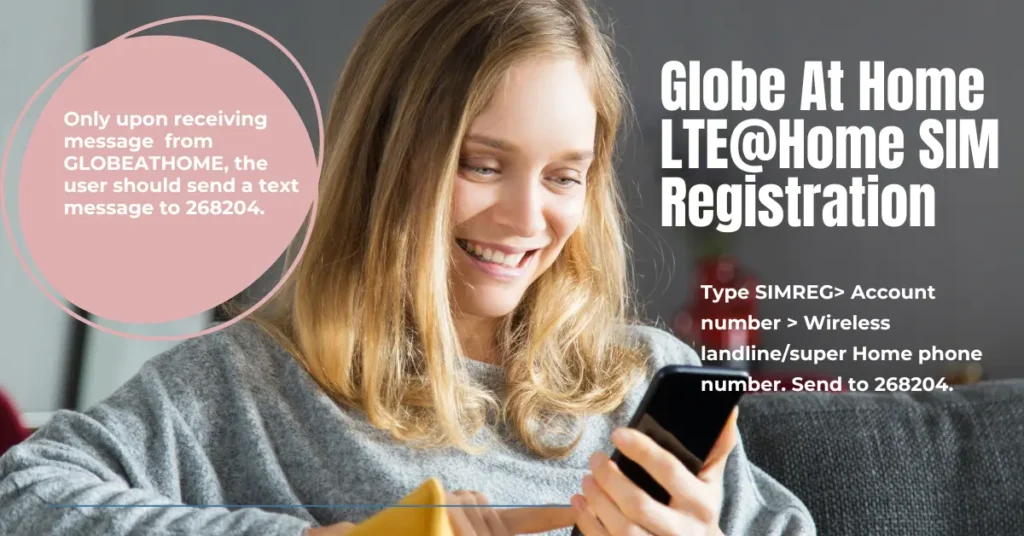
Globe at-home user donot need to anything unless they receive a text message from GLOBEATHOME to verify their detail.
- Once the message is received from GLOBEATHOME:
- The Globe at-home user should send a text message to 268204.
- Type SIMREG> Account number > Wireless landline/super Home phone number. Send to 268204.
- This will serve as a confirmation that the details that were submitted at the time of the postpaid line application are accurate.
Do not send your account details and SHP number to any random number. Make sure you received a message From “GLOBEATHOME” and text only at “268204.
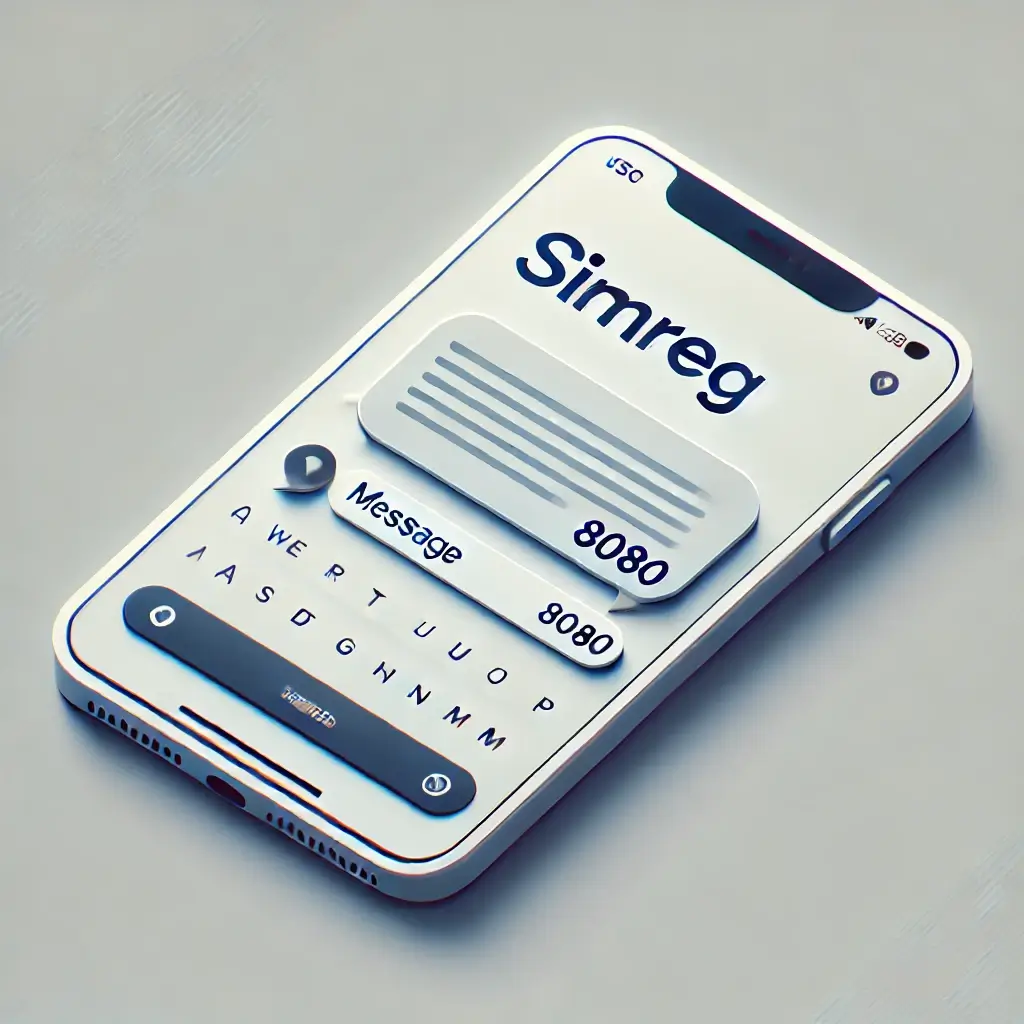
Globe Postpaid customers do not have worry to about initiating the registration process as Globe already has their information and identity proof, which they submitted at the time of Globe postpaid application
Postpaid users can complete the registration process in just one step:
- Postpaid users should just type “SIMREG” and send it to 8080
- In response to the text message, Globe will send a confirmation message that registration is completed successfully.
Registration is equally essential for at-home Prepaid wifi users to enjoy uninterrupted and secure digital activities.
- Purchase your at-Home prepaid wifi kit either from any Glober retailer or Place your order via the Globe Online shop.
- Use the instructions Manual and setup your device
- Connect it to the power adaptor> Turn on your Home wifi drive.
- Download and install the GlobeOne App and register using your personal Globe number.
- Enroll your Home prepaid Wifi account by following these Steps:
- Add Account > Enter HPW number (you can get it from the back of your Modem) > Select Modem model > Enter Username and ID > Write a nickname for your Wifi > Enter personal Globe SIm number > Enter OTP code > Your Device is enrolled now.
- Proceed to registration by clicking “ Register my SIM.”
- Go to the Globe ONE app and proceed to registration by clicking “ Register my SIM.”
- Enter your information, choose one government-issued card, enter your ID number, and upload a picture of your ID and a clear Selfie photo (max size 4MB).
- Enter the OTP that will be received on your phone.
- Click Submit > Check the box to accept Terms and conditions > Click proceed and you will get a reference code along with the message that the registration request has been received.
- Ensure to save the reference number.
For Globe SIM card registration under a company name, the Authorized Representative should have the following information prepared:
- Full Name of the Authorized Representative
- Date of Birth
- Gender/Sex
- Nationality
- Company Name
- Company Address
- Type of Government ID provided + ID number
- A valid government-issued ID with a photo (maximum file size: 4MB)
- Certificate of Registration or DTI Registration (maximum file size: 4MB)
- Board Resolution or Proof of Authority appointing the Authorized Representative OR a Special Power of Attorney (maximum file size: 4MB)
Additionally, you must certify that all the information provided is accurate and true.
What are Benefits of SIM Registration
- Access to Share-A-Load – Easily send load to family and friends.
- Globe Rewards Points – Earn points for calls, texts, and data to redeem promos or gifts.
- Eligibility for Globe Postpaid Plans – Apply for Globe Plans with iPhone, Samsung, or other premium phones.
- Secured Mobile Number – Protect your SIM from scams. frauds and identity theft.
- Full Access to Globe Services – Enjoy GCash, Go+ promos, and exclusive offers.
- Enjoy Globe Roaming Services – Subscribe for Globe Roaming services at discounted rates.
- Better Customer Support – Faster help for registered users.
Read More: Benefits of the SIM Registration
How To Activate Globe SIM?
If you purchased a new Globe SIM and haven’t registered your SIM Card yet, it’s crucial to register your SIM right now. It will not only protect your data but also help in cracking down on frauds. Ensure to visit legit Globe SIM registration link: simreg.globe.com.ph/globe_digital_onboarding
New SIM? Follow These Steps:
- Insert the SIM into your phone.
- Wait for the signal bar to appear.
- Turn off airplane mode.
- You will get a “Welcome to Globe” text.
- Dial *143# or open the GlobeOne App.
- Register your SIM to activate all features.
Already registered but Globe SIM not working?
- Restart your phone.
- Try SIM in another phone.
- Call Globe support at 211.
Postpaid SIMs are active by default after registration.
Globe Comparison with Other Networks in the Philippines
While Globe has simplified the SIM registration process, other telcos like Smart Communications and Sun Cellular have slightly different approaches.
- Smart Communications offers an online verification system for both prepaid and postpaid users, whereas Globe provides the option of registering via the GlobeOne app and SMS.
- Sun Cellular has a simpler registration process but often requires users to visit stores, making it more difficult for those without internet access.
What is Timeline of Globe SIM Registration
- Step 1: Go to Globe SIM Registration Portal (Immediate)
- Step 2: Submit Documents (3-5 minutes)
- Step 3: Receive OTP & Confirm (5-10 minutes)
- Step 4: Wait for Confirmation (24-48 hours)
- Step 5: Complete Registration (Up to 7 days for verification)
SIM Replacement After Registration
If your Globe SIM is lost or damaged after registration, you can visit a Globe store for a replacement SIM. You’ll need to provide proof of identification again to ensure your account remains secure. The new SIM will be linked to your registered details, and you’ll retain all the benefits of your original registration.
Globe SIM Registration is essential for keeping your mobile services active and secure. As someone who’s experienced the process firsthand, I can confidently say that completing it early is the best way to avoid interruptions. Register your SIM today to stay connected and take advantage of the benefits without the hassle of errors or deactivation later on.
Conclusion: Personal Experience and Why Registration Matters
After registering my own Globe SIM, I can confidently say that it’s worth completing the process early to avoid service interruptions and errors. The SIM Registration Act is here to protect us, but it’s essential to get ahead of any issues like OTP failures or ID rejections. I know firsthand how frustrating it can be when your SIM remains unregistered or you run into technical issues.
By following the clear steps outlined in this guide and using the official Globe website and GlobeOne app, you can secure your SIM and stay connected without hassle. Don’t wait for the deadline, register your Globe SIM today to avoid deactivation and take full advantage of all the benefits Globe has to offer.
Frequently Asked Questions (FAQs)
Is Globe SIM Registration Free?
Yes, SIM registration is completely free of charge.
How Long Does It Take to Register a Globe SIM?
The registration process can take a few minutes. However, document verification may take longer depending on the method chosen.
Can I Register More Than One SIM?
Yes, you can register multiple SIM cards under the same name. Ensure that each SIM is correctly registered.
What If I Don’t Have an ID?
If you do not have an accepted ID, visit a Globe store to inquire about alternative documents.
What is the Globe SIM registration Online Link?
The official website Link for online registration is : https://new.globe.com.ph/simreg
How do I complete my Globe SIM card registration online?
- Go to the Globe Official website or Install the GlobeOne App. https://new.globe.com.ph/simreg
- Enter your mobile number
- Enter the OTP that is received on your mobile number
- Enter ” About You” information, including your Name, Address, Age, and Gender.
- Choose the Government ID option from the list, upload a copy of your ID, and upload your selfie.
- Review and agree terms and conditions and click Submit- Congrats! You have completed your Globe SIM card registration.
- Save the Reference number.Ca
Can I register my old number to a new SIM?
Yes, absolutely. MNP (Mobile Number Portability) allows you to keep an old number on a new SIM card, and you can transfer it without any charges.
- Contact Customer support of your network provider to initiate the number transfer process.
- Provide Required Detail: Keep your old SIM number and ID card with you and provide the required information to a customer representative; they will assist you in completing the transfer.
How can I check the Globe registration reference number?
When you will complete your sim registration process, upon submitting the form online, the reference number will show up on the screen. you should save the reference number.