How to Share a Load in Globe: Easy Guide for 2025 (Prepaid & Postpaid)
Need to send load to family? Globe makes it easy! Bookmark this guide for later!
Globe Telecom has officially announced that share-a-load service has been discontinue since Dec,2022 for Globe SIM users. No need to panic, there are several alternative ways to send load Globe to friends and family. I’ll share quick steps about how to share a load in Globe using text codes, dial codes, or the GlobeOne app to pasaload. Let’s get you back online fast.
What is Globe Share-A-Load?
Globe Share-A-Load lets you send load to friends and family easily. You can share mobile credits in seconds, anytime you need.
This helps you stay connected, even when someone runs out of load. Sharing load is simple, safe, and perfect for emergencies.
Globe offers several ways to pasaload without hassle.

How to Share a Load in Globe-
Globe makes load sharing easy for both prepaid and postpaid users. You can use text messages, USSD codes, apps, or GCash to send load.
Here’s how you can quickly share a load Globe prepaid and postpaid
Share a Load in Globe via *143# USSD Code
You can also share a load Globe prepaid using a simple dial code.
Here’s the step-by-step:
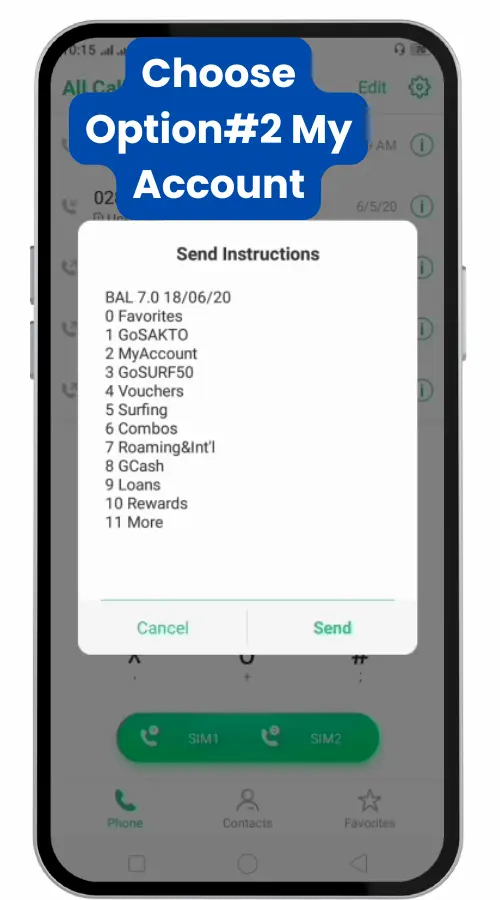
- Dial
*143#on your Globe phone. - Choose “My Account” from the menu.
- Select “Share-A-Load/Promo/MB”.
- Choose “Share Load” option.
✅ Tip: If asked, use your 4-digit Share PIN for extra security.



- Enter the recipient’s 10-digit number.
- Write the amount you want to send.
- Write “YES” to confirm the transaction.
- You will receive confirmation message.
✅ Tip: If asked, use your 4-digit Share PIN for extra security.


Share a Load via SMS (Text Message)
Sending load through text is simple and fast. Globe has discontinued old traditional method to share load via SMS, you can try below modified method.
Follow these easy steps:
- Open your messaging app.
- Modify Recipient’s 10-digit number –Replace 0 with 2. Example: ( 09171234567 to 29171234567 )
- Compose and Send the Load: Type the amount you want to send and send it to the updated number.
- Add a PIN (Optional): If you have a PIN, include it in the message (e.g., write in message “100 1234” and send to 29171234567).
- You will receive a confirmation message.
- Reply YES to confirm the load transfer.
Tip: Always double-check the number and amount before sending.
Note: Globe’s old Share-A-Load feature using PINs has been discontinued for new users in December 1, 2022.
Use GlobeOne app if SMS sharing fails.
Share a Load in Globe via GlobeOne App
The GlobeOne app is now the easiest way to send load Globe prepaid.
No PIN needed. Simple taps do the work.
Follow these steps:
- Open the GlobeOne app on your phone.
- Log in with your mobile number.
- Tap Shop and choose Buy Load.
- Enter your recipient’s number.
- Select the amount you want to send.
- Confirm the payment and complete the transaction.
Tip: Using GlobeOne also lets you track your sent loads easily.
Share Load Using GCash
When GlobeOne or SMS is not available, you can use GCash.
GCash allows easy mobile load sharing too.
Follow these quick steps:
- Open your GCash app.
- Tap Buy Load.
- Enter the recipient’s Globe or TM number.
- Choose the load amount.
- Confirm and pay using your GCash balance.
Tip: GCash sometimes offers promos or cashback when you buy load.
How to Set or Reset Your Globe Share PIN
Setting a Globe Share PIN keeps your load transfers safe.
You need a PIN if you send load using SMS or *143#.
Here’s how to create your Share PIN:
- Open your messaging app.
- Type REG [space] 4-digit PIN [space] hint.
- Example:
REG 1234 mothermaiden.
- Example:
- Send the message to 2916.
- You will get a confirmation SMS.
Tip: Choose a PIN you can remember but others cannot guess.
If you forgot your PIN, reset it easily:
- Open your messaging app.
- Type RESET [space] [4-digit new PIN] [space] hint.
- Example:
RESET 5678 petsname.
- Example:
- Send it to 2916.
- Confirm your reset through the SMS you receive.
Important: Never share your PIN with others. It protects your load.
Share Promos, Data, and MBs with Globe or TM
Sharing Globe promos or mobile data is as easy as sending load.
You can send regular load, promos, or even megabytes of data.
Here’s how to share promos:
- Dial
*143#on your phone. - Choose “MyAccount”.
- Tap “Share-A-Promo”.
- Pick the promo you want to share.
- Enter the recipient’s number and confirm.
Tip: Some promos allow partial sharing, like data bundles or unlimited texts.
Here’s how to share mobile data (MBs):
- Open your messaging app.
- Type Share MB [space] Recipient’s number [space] Amount of MB.
- Example:
Share MB 09171234567 100.
- Example:
- Send it to 2 + Recipient’s number (example: 29171234567).
- Confirm when you get a reply SMS.
Important: Only selected Globe data promos allow MB sharing. Check before you try.
Globe Prepaid vs Postpaid Load Sharing
- Prepaid: Globe/TM prepaid lines can share load Globe prepaid balance to other prepaid accounts.
- Postpaid: Globe postpaid accounts do not have transferable load. You cannot share load Globe postpaid because postpaid plans are billed monthly, not topped up with load.
- Networks: Sharing works only between Globe and its partner TM. You can’t share load to Smart or other networks.
- Limits: Each transfer is ₱1–₱150. You can do multiple transfers up to any daily limit Globe sets (typically several transactions per day).
- Example: If you want to help a family member on postpaid, use GlobeOne or GCash to pay their bills instead.
Common Problems When Sharing Load and How to Fix Them
Sometimes sharing load hits a snag. It can fail if your balance is too low or if the number is wrong. Below are common errors and quick fixes so you can send load smoothly.
Low Balance: Your load transfer will fail if you don’t have enough credits. Top up first, then try again.
Wrong Number: Always double-check the recipient’s mobile number. Globe can’t reverse a transfer if you send to the wrong number. Include the correct “2” prefix (e.g. send to 2+0917xxxxxxx when texting).
Network Delay: Sometimes a transfer is slow or gets stuck on a weak signal. Wait a minute and retry. If the recipient still doesn’t get it, have them restart their phone or check coverage.
Daily Limit: Globe caps how much you can send per day (around ₱500 total) If you hit the limit, just wait until the next day to try again.
No Confirmation: After sending, Globe will text you a confirmation request (usually with “YES” or a code). If you miss replying or reply incorrectly, the share won’t go through. Always respond to that prompt right away.
Things You Should NOT Do While Sharing Load
Avoid these mistakes to keep your transactions error-free:
- Don’t send without confirming: Never ignore Globe’s confirmation text. If you don’t reply with the correct code (like “YES”), the transfer won’t happen.
- Don’t share the wrong number: Always verify the recipient. Globe won’t refund or reverse a share sent to the wrong phone.
- Don’t forget the prefix: If using SMS, remember to put “2” before the Globe/TM number (e.g. 2+0917xxxxxxx). Skipping it can stop the text from reaching Globe’s system.
- Don’t exceed your balance: Never attempt to send more load (plus fee) than you have. The transfer will fail if your credits run out mid-transaction.
- Don’t bypass limits: Globe sets daily sending limits (around ₱500). Trying to send more will just fail or get blocked. Spread out your shares if you need to send a lot.
- Don’t share sensitive info: Globe or GCash will never ask for your passwords, PINs, or one-time codes. Never give these out, even if someone says they’re helping you load.
Frequently Asked Questions
Quick Recap: Best Ways to Share Load in 2025
Sharing load with Globe has never been easier. Whether you’re helping out family, friends, or topping up another phone, you have fast and simple options.
- Text Message: Just send a quick SMS to share load anytime, anywhere. Always remember to confirm when prompted.
- *Dial 143# USSD Code: No internet needed. Just a few taps and you can pasaload in seconds.
- GlobeOne App: For smooth, instant transfers with no hassle. Great if you often share load or promos.
- GCash: Perfect backup method if SMS or GlobeOne doesn’t work. You can also send load to any Globe or TM number directly through GCash.
- Always double-check the recipient’s number.
- Make sure you have enough balance to cover the load plus the fee if any.
- Respond quickly to Globe’s confirmation texts to complete your pasaload.
Bottom line:
Globe makes it super easy to share your load in 2025 — you just need to pick the best method for you and stay a little careful while sending!
Stay ready anytime!
Save this page or share it with family and friends who might need a quick pasaload help!