
Globe One App: Your Ultimate Friend for Seamless Connectivity

As Globe Telecom’s all-in-one app, Globe One simplifies your mobile and broadband experience.You can manage all your Globe services—promos, roaming, bills—in one app, saving time and money. This 2025 guide covers the most popular features, like subscribing to promos, activating roaming, and paying bills, with tips to maximize value. Whether you’re a student streaming videos or a traveller needing data abroad, keep reading to unlock GlobeOne’s full potential!
What is Globe One?
GlobeOne serves as your digital hub for managing Globe and TM accounts. Available on Android and iOS, this app lets you subscribe to promos, pay bills, track data, and activate roaming plans. You can also redeem exclusive deals for shopping or streaming.
Benefits:
- Control all accounts in one place.
- Access exclusive promos and rewards.
- Monitor data usage in real-time.
- Simplify bill payments and roaming setup.
How To Create Account on Globe One APP and Pay Bills?
Top Features of Globe One
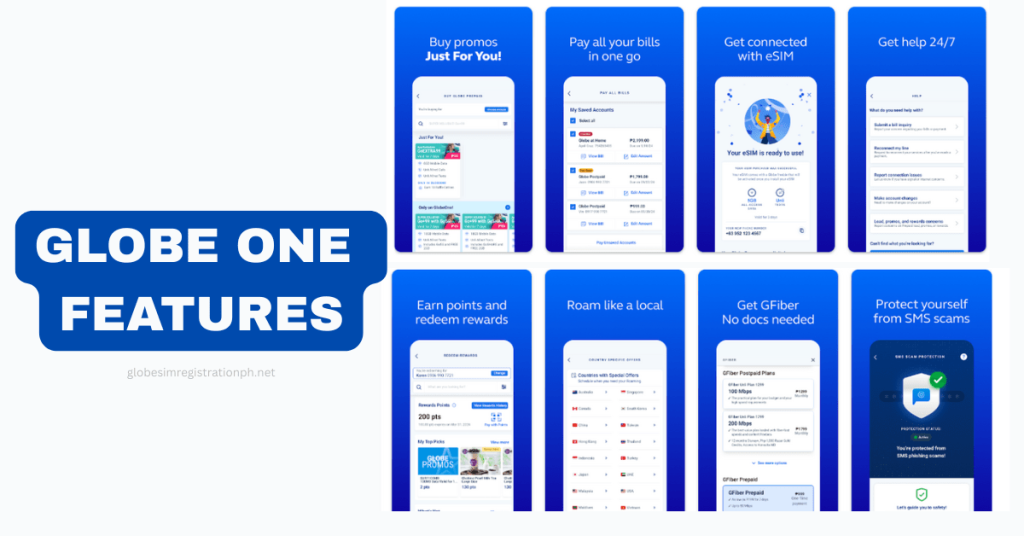
Most Popular and Highly Searched Features
GlobeOne App packs powerful tools to manage your connectivity.
Promo Management
Subscribe to high-demand promos like Go+99, GoEXTRA149, and UnliGo299. Stack promos or extend validity with GoBOOSTER for extra savings. For example, Go+99 gives 26 GB for PHP 99, perfect for streaming.
Roaming Activation
Activate Roam Surf or GoRoam plans for travel in over 100 countries. Check your roaming balance and usage abroad directly in the app. I activated Roam Surf 999 in Singapore, keeping me connected for maps and calls!
Data Usage Monitoring
Set data alerts to avoid overages. View detailed usage history to track your daily consumption. This feature saved me from unexpected charges during a Netflix binge.
Bill Payment and Auto-Renewal
Pay postpaid bills or renew prepaid services with a few taps. Set up auto-payments for hassle-free renewals. A friend uses this to keep her GPlan PLUS active without worry.
Exclusive Deals
Redeem vouchers for Lazada, ZALORA, or streaming apps like Disney+. These perks add value to your Globe account, unlike competitors’ apps.
[ninja_tables id=”2600″]
How to Get Started with Globe One
Download GlobeOne to manage your Globe services in minutes. Follow these steps to set up the app and start exploring its features.
- Step 1: Download the App
Find GlobeOne on the Google Play Store or Apple App Store. Search “GlobeOne” and install it for free. Ensure you have a stable internet connection. - Step 2: Register or Log In
Open the app and sign up with your Globe registered number or email. Existing users can log in with their credentials. Verify your number with an OTP for security. - Step 3: Explore the Dashboard
Navigate to sections like “Promos,” “Roaming,” “Billing,” or “Rewards.” The dashboard shows your balance, active promos, and data usage at a glance.
Tip: Confirm your SIM is registered per the Philippine SIM Card Registration Act to avoid issues. I downloaded GlobeOne before a trip and activated a promo in under five minutes!
Globe One for Roaming: A Traveler’s Best Friend
Traveling abroad? GlobeOne simplifies roaming activation for over 100 countries, making it a must-have for travelers. Manage plans like Roam Surf and GoRoam with ease.
- Why It’s Popular
Activate roaming plans instantly and check usage on the go. GlobeOne supports 5G in over 50 countries, like Japan and the USA, for fast connectivity. - Top Roaming Promos
- Roam Surf 399: 1 GB for 1 day (PHP 399).
- Roam Surf 999: 3 GB for 3 days (PHP 999).
- GoRoam Japan: 2 GB for 5 days (PHP 800).
- GoRoam USA: 30 GB for 30 days (PHP 3000).
- GoRoam Singapore: 20 GB for 15 days (PHP 1500).
- How to Activate
- Prepaid: Text “ROAM ON” to 333, then select a promo in GlobeOne under “Roaming.”
- Postpaid: Check plan eligibility in GlobeOne, go to “Shop,” and choose a roaming offer.
- Check balance via GlobeOne’s “Roaming” tab or text “ROAM BAL” to 8080.
Maximizing Globe One for Everyday Use
Get the most out of GlobeOne with these smart tips for daily connectivity.
- Set Data Alerts: Avoid overages by enabling notifications in the “Data” tab.
- Subscribe Quickly: Use GlobeOne to activate promos like Go+99 in seconds.
- Redeem Deals: Grab vouchers for Lazada or Disney+ under “Rewards.”
- Stack Promos: Add GoBOOSTER to extend promo validity, a trick competitors rarely mention.
I set data alerts during a Netflix marathon and saved on extra charges. These hacks make GlobeOne a game-changer!
Globe One vs. Competitors
GlobeOne stands out against other telecom apps like Smart’s GigaLife.
- Why Choose GlobeOne?
- Integrated Roaming: Activate and manage roaming plans seamlessly, unlike GigaLife’s limited options.
- Exclusive Deals: Offers vouchers for shopping and streaming, a feature competitors lack.
- User-Friendly Interface: Intuitive design makes navigation easier than other apps.
User Insight: “I switched to GlobeOne from GigaLife because it’s simpler and has better rewards.” – Carlo, a freelancer.
Troubleshooting Common Issues
Run into problems with GlobeOne? Try these fixes.
- App Not Loading: Check your internet or update the app to the latest version.
- Promo Not Activating: Ensure sufficient load or contact support at 211 or 02-7730-1000.
- Login Issues: Clear app cache or reinstall if you can’t sign in.
Tip: I fixed a login glitch by clearing the cache, saving a call to support.
8. Future of Globe One
GlobeOne continues to evolve with cutting-edge features.
- 5G Support: Enhanced speeds in over 50 countries for promos like Go+99.
- Partner Integrations: More streaming and e-commerce deals, like Netflix or Shopee.
- AI Personalization: Tailored promo suggestions based on usage.
Conclusion
GlobeOne makes managing your Globe services quick and fast, from subscribing to Go+99 to activating Roam Surf for travel. Download the app today and explore its features to save time and money. What’s your favorite GlobeOne feature?
What exactly is the GlobeOne App and why do I need it?
The GlobeOne App is your digital hub for managing all Globe and TM services—including prepaid, postpaid, broadband, and promos—from a single dashboard. It streamlines your mobile experience with promo purchases, bill payments, data tracking, and exclusive deals all in one place.
How do I create an account and set up GlobeOne?
Getting started is easy:
Download GlobeOne from your app store (iOS, Android, or AppGallery).
Tap Create an account, enter your registered mobile or email, verify with OTP, then set and confirm your 6-digit PIN.
You can now log in, explore promos, and access your account dashboard.
What are GlobeOne’s main features?
Promos: Browse and activate SuperXclusive promos like Go+99 and GoRoam instantly.
Billing & Rewards: View statements, pay bills (Globe and other providers), earn and redeem Globe Rewards points.
Account Management: Link multiple Globe/TM accounts, register SIMs, and check data usage.
Security Features: Benefits include SMS Scam Shield to filter harmful links.
Can I pay all my bills through GlobeOne?
Absolutely. GlobeOne supports seamless payment for Globe postpaid and broadband accounts, plus other service providers like utilities and credit cards. Payment methods include GCash, credit/debit cards, bank transfers, and e-wallets.
What should I do if GlobeOne isn’t working properly?
Try these steps for common issues:
App not loading? Ensure your device meets minimum OS requirements (Android 5.0+, iOS 14+).
OTP issues or account errors? Confirm your number is valid, swipe to refresh, update the app, or retry later.
Can’t view bill? Navigate to My Transactions → Bill Statements to access or download up to 24 months of billing history.