TNT SIM REGISTRATION

TNT SIM Registration has become mandatory after the implication of the SIM Registration Act in the Philippines. Your SIM card will be deactivated in case of failure in registration.
You can click the below link to access the TNT SIM registration form right now.

- Visit the TNT Registration App or Smart TNT SIM Registration link. smart.com.ph/simreg
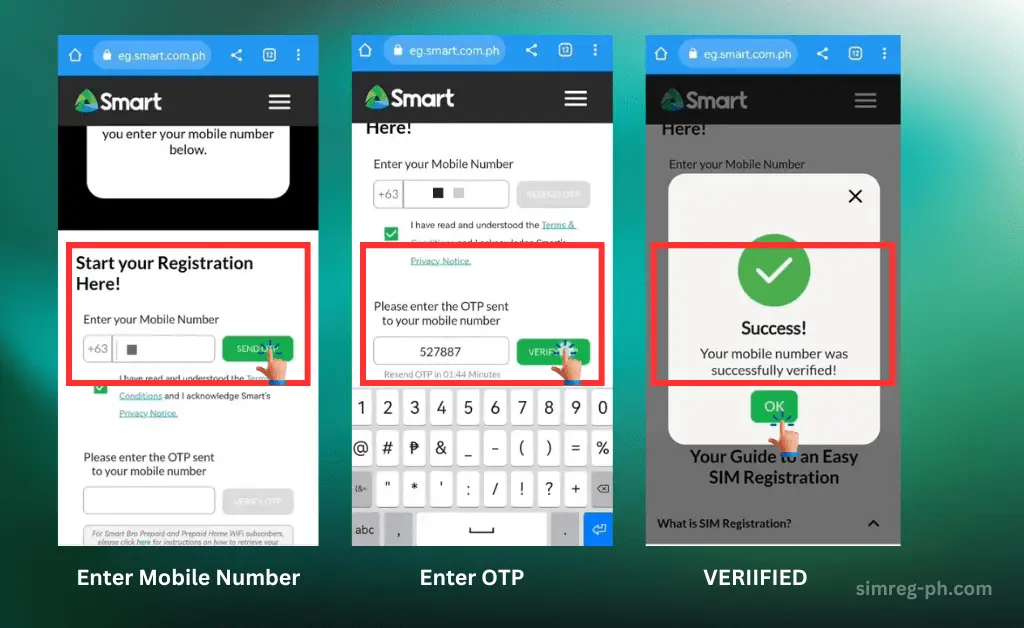
- Enter your mobile number and request a One-Time Password (OTP).
- Enter the OTP sent to your number.
- Complete TNT SIM CARD Registration form: Provide your personal information (full name, birthdate, address, etc.).
- Upload a valid government-issued ID and a clear selfie.
- Submit the form and wait for confirmation via SMS.
When you finish reading, you will be aware of why registration matters, how to register a TNT sim card step-by-step(online and offline), and tips and tricks to avoid common mistakes for Hassel-free sim car registration.
The great news is that the Registration process is straightforward, and this personally tested and verified guide is going to make it even simpler.
SIM registration isn’t just a requirement of the Philippines SIM registration law, but it is a smart move toward the enahnced security of your data from online fraud; pretty important.
What Is TNT SIM
How To Register SIM Card TNT
SMART Telecom, the parent company of TNT SIM, has introduced multiple platforms to register sim cards. You can register SIM online through the official online link smart.com.ph/simreg or by using the TNT SIM registration APP known as the “GigaLife App.” Offsite offices and stores are also established to assist users in completing registration
TNT SIM Registration Online
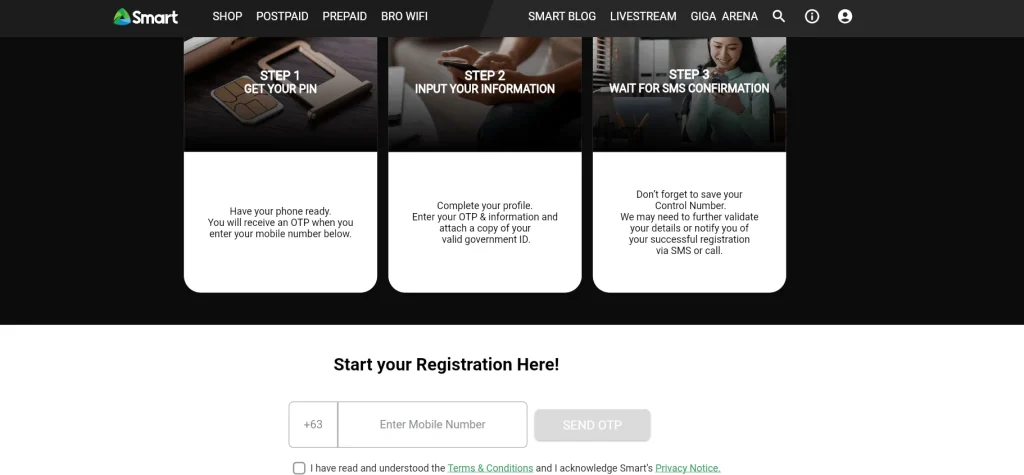
Step-by-Step Guide to Register SIM Card TNT:
Personally, I prefer to register my new sim card online via the official website at the ease of my couch. Online registration is fast and easy. Here’s what you need to do:
#1- Visit the official TNT/Smart registration portal
- Go to the official Smart SIM Registration Website for TNT users:

#2- Enter your TNT SIM card Number
#3- Upload a valid government-issued ID.
💡Choose ID from the dropdown list; if you are a foreigner (tourist on a Visit Visa, international student, Or on a Work Permit, you will need to submit a visa and passport –Select Required Documents.
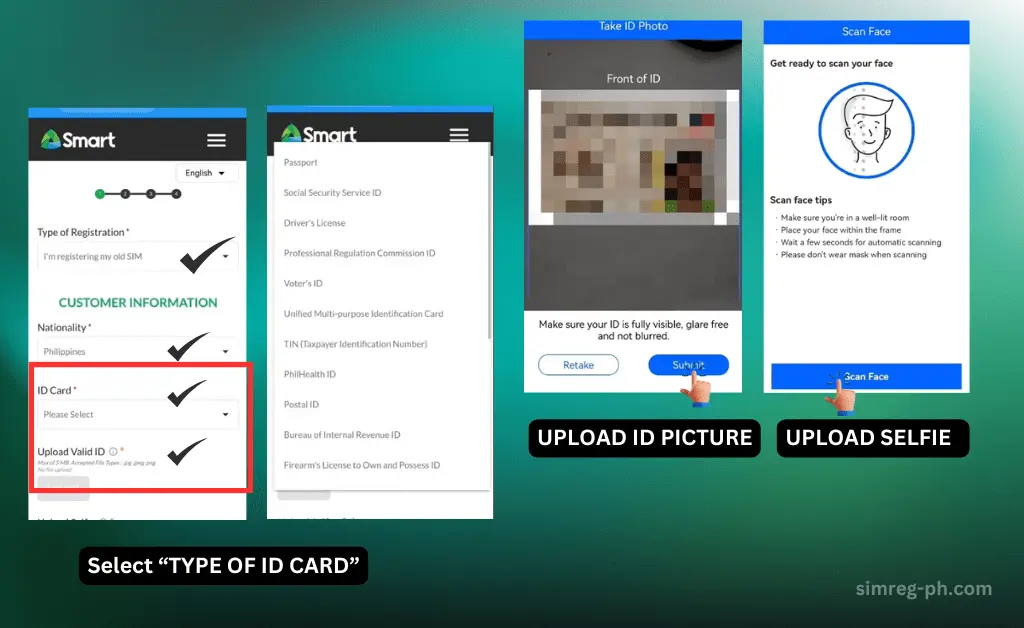
#4- Fill in your details
Provide essential details like:
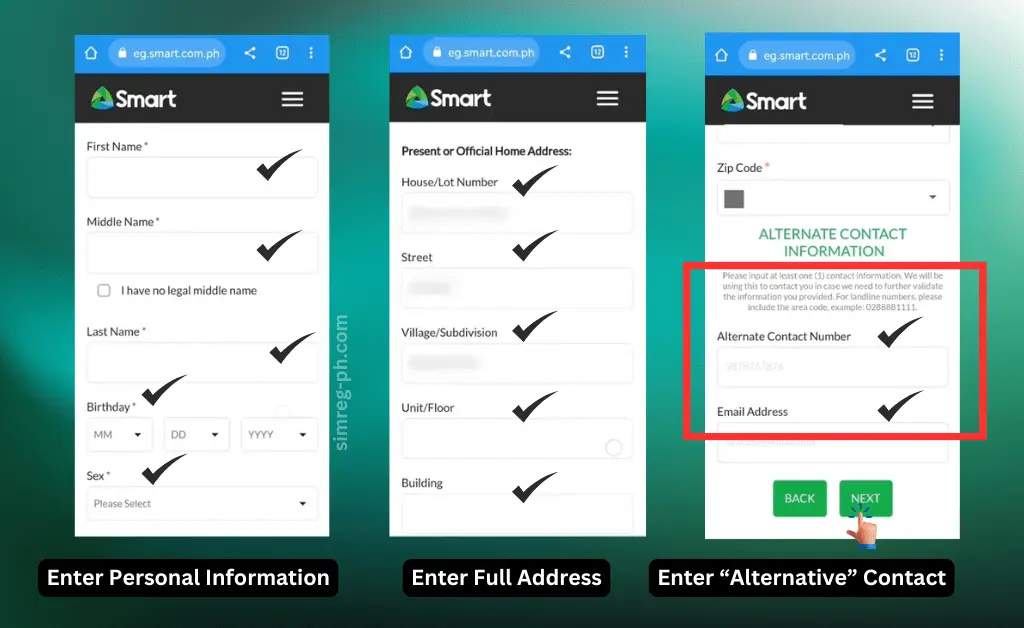
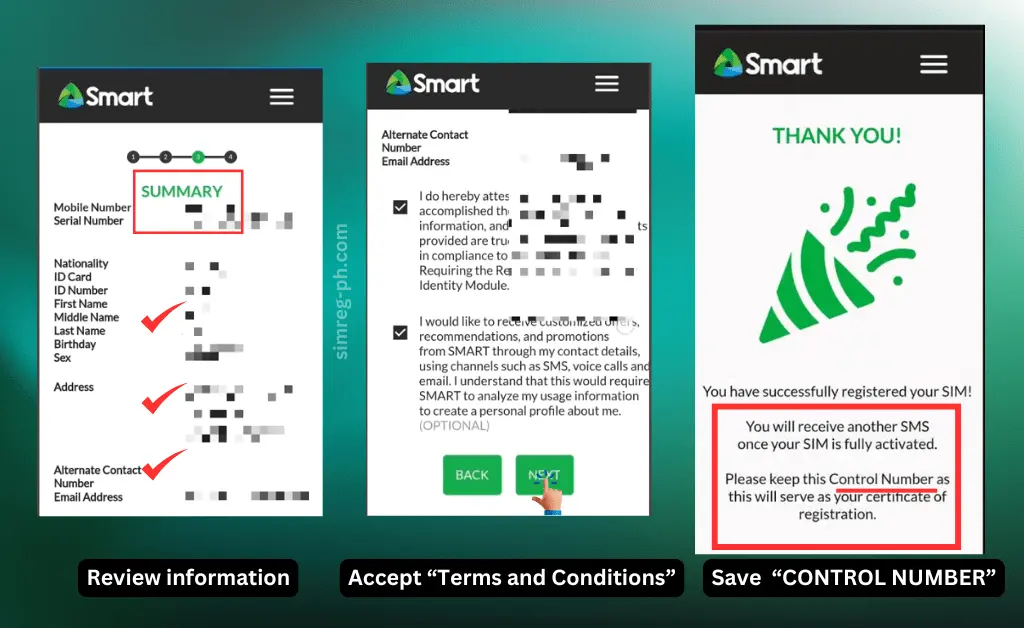
#5- Submit The Registration Form:
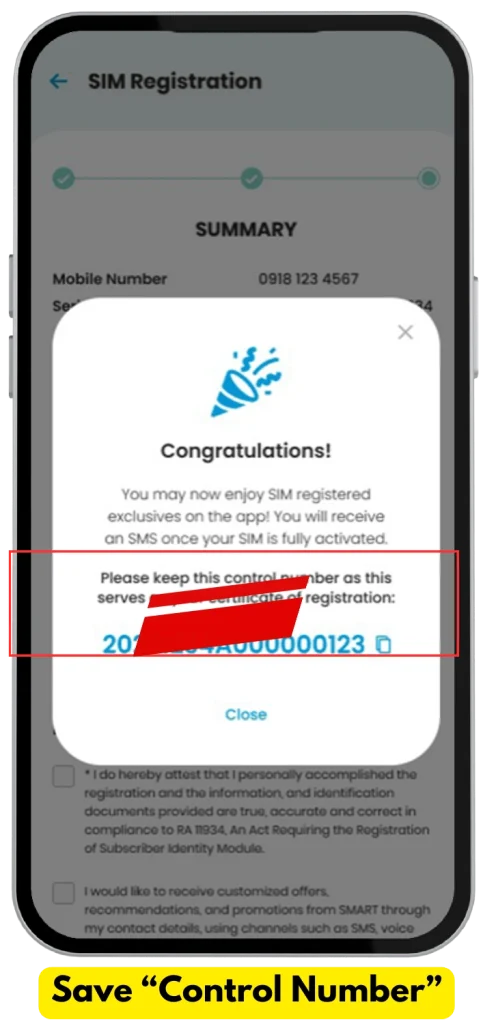
Ensure to save the “Control number” as this is your TNT SIM registration number, and you may need it in the future as proof of registration.
Pro Tip: Use a stable internet connection to prevent interruptions during the process.
TNT SIM Registration App (SMART APP/ GIGALIFE APP/)
Smart Telecom has introduced its App for Android and iOS users. Previously, this app was known as the GigaLife App, but the name has changed to “Smart App.”
How to Register Your TNT SIM via Smart App (GigaLife App)?
For TNT users, SIM registration is now easier than ever through the “Smart App” (GigaLife App).
Here is a personally tested procedure to register a SIM card quickly..
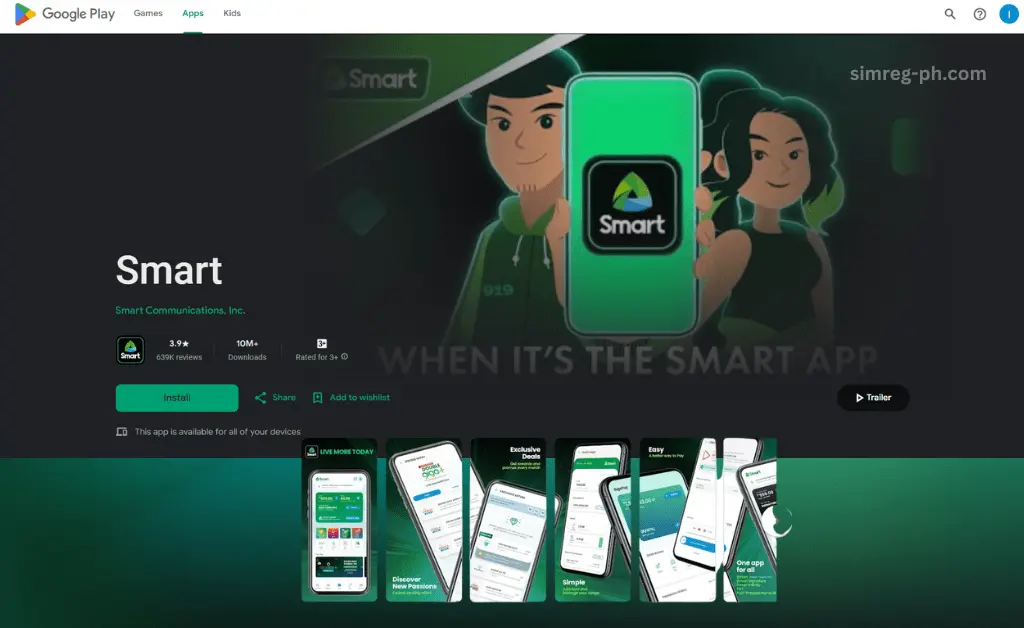
Step 1: Download or Update the Smart App/ GigaLife App
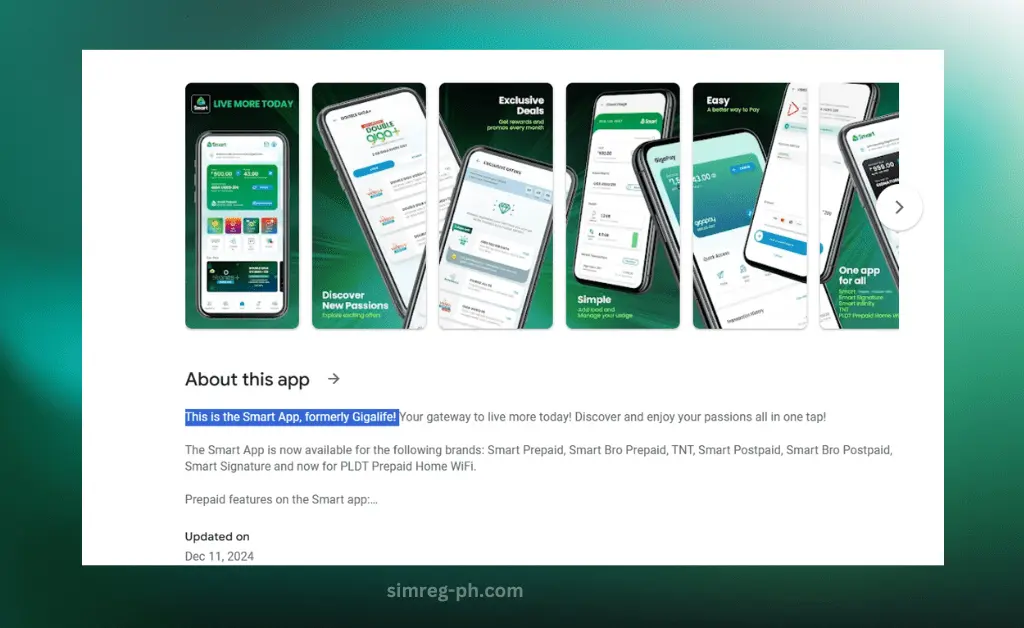
Ensure you have the GigaLife App installed on your smartphone. If you don’t have the App already installed, then install it first from the Play Store or Apple Store:
- For Android: Download it from the Google Play Store.
- For iOS: Get it from the Apple App Store.
If you already have the app, ensure it’s updated to the latest version to access the SIM registration feature.
Step 2: Log In or Create an Account
Once the app is installed:
- Open the GigaLife App.
- Log in using your TNT mobile number.
- If you don’t have an account yet, click on “Create Account” and follow the prompts to sign up.
Step 3: Start the Registration Process
After logging in, you’ll see a banner or notification prompting you to register your SIM.
- Tap on “Register SIM Now.”
- Enter the TNT number that you want to register
- Enter the One-Time Password (OTP) that is sent to your TNT number for verification.
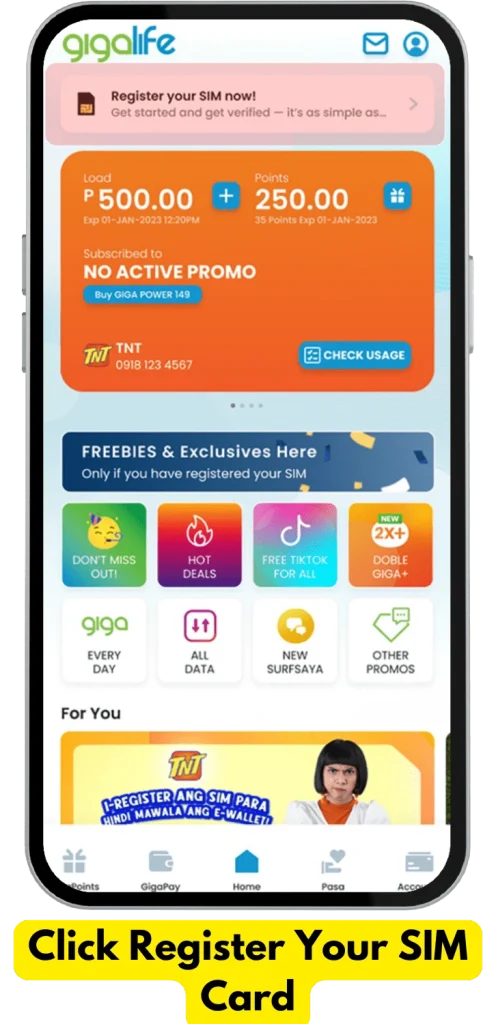
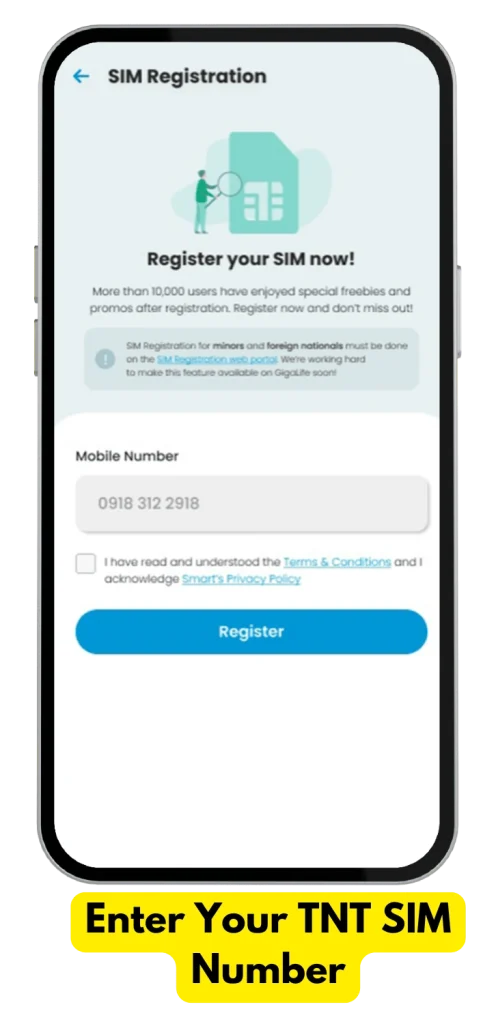
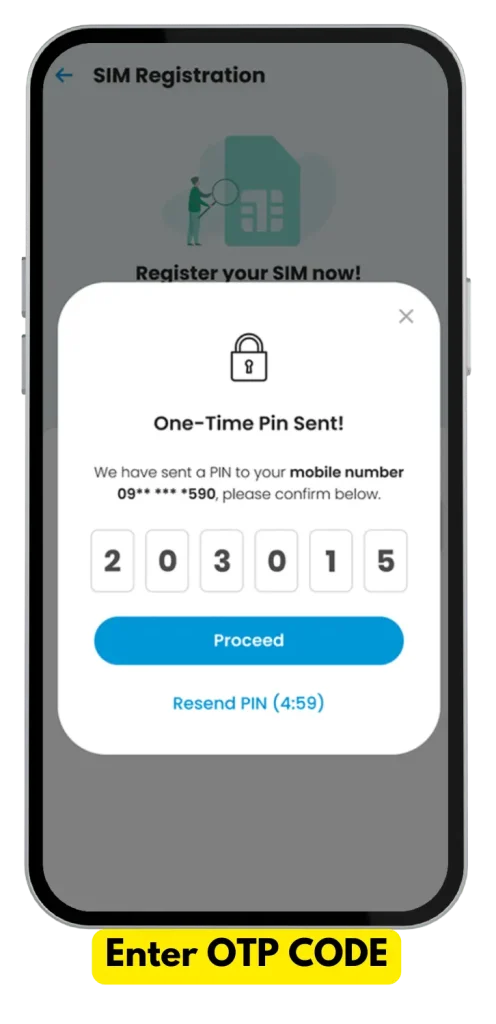

Step 4: Upload Your Valid ID and Selfie
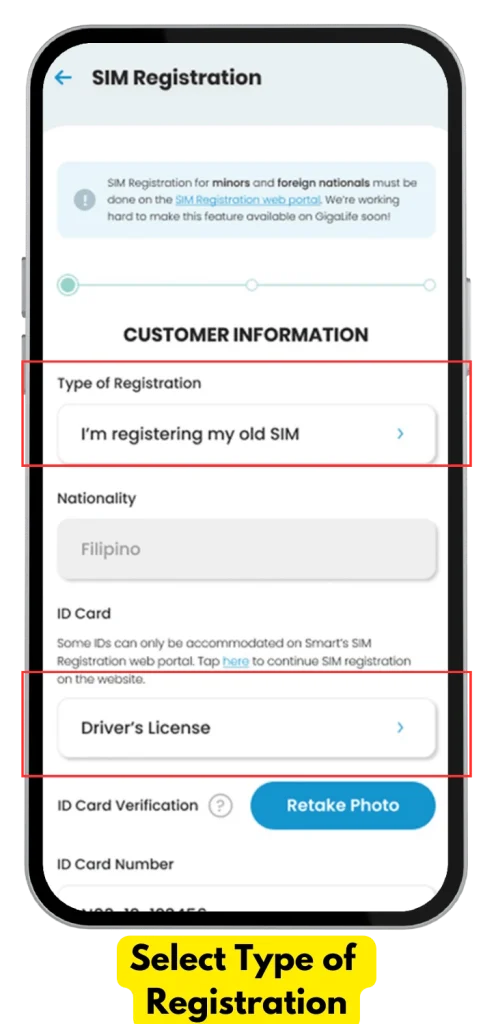
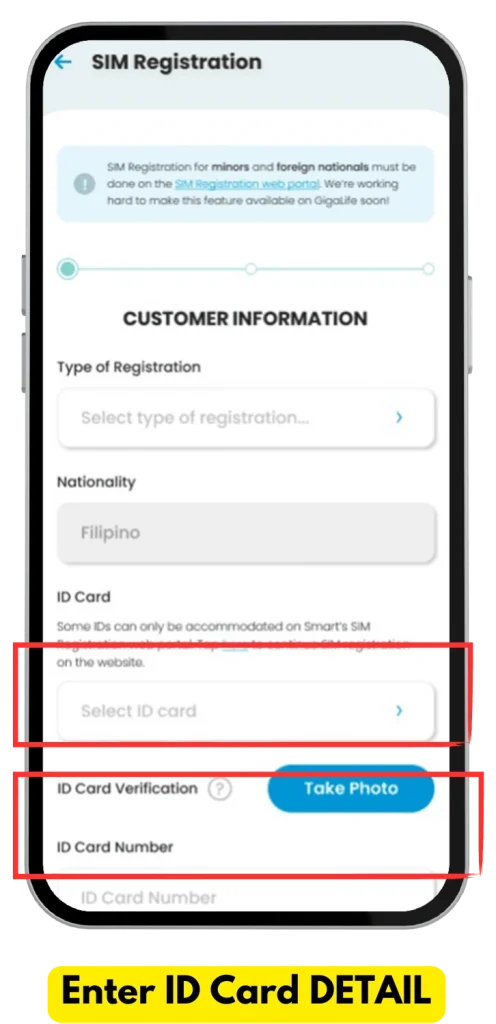
Complete the registration form by entering “Customer information” into the required fields:
- Select your type of ID from the list (e.g., Passport, Driver’s License, National ID).
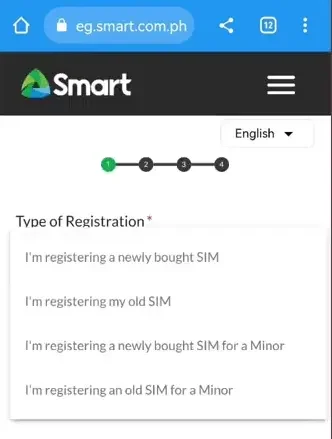
- Select Type Of Registration. (Registering old Sim /New Sim, etc)
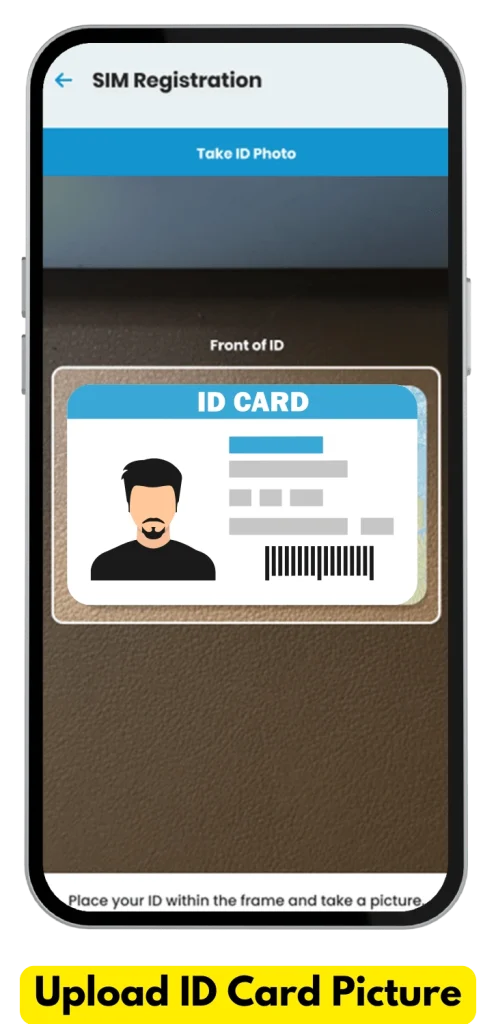
- Take a clear photo of your ID and upload it.
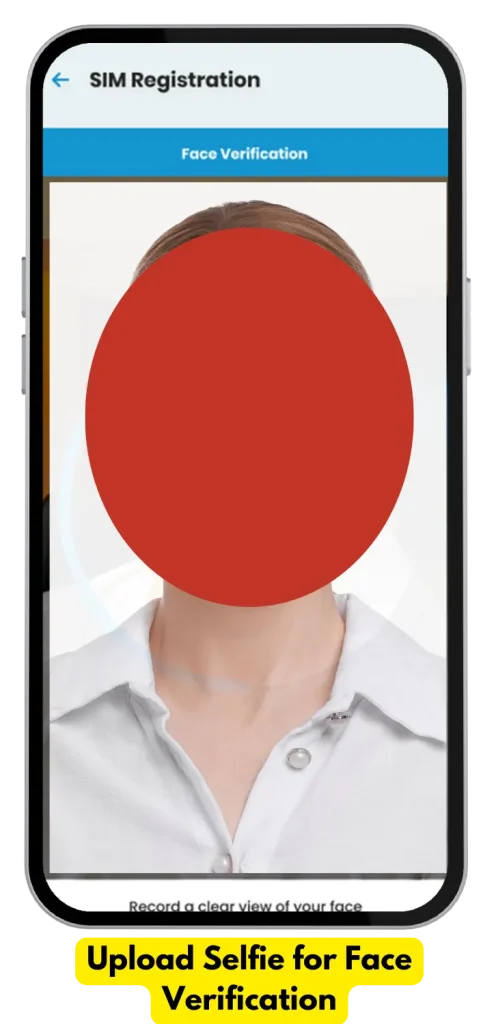
- Take a selfie for face verification. Ensure you’re in a well-lit area and your face is visible.
💡Pro Tip: Double-check that your ID and selfie match to avoid rejection.
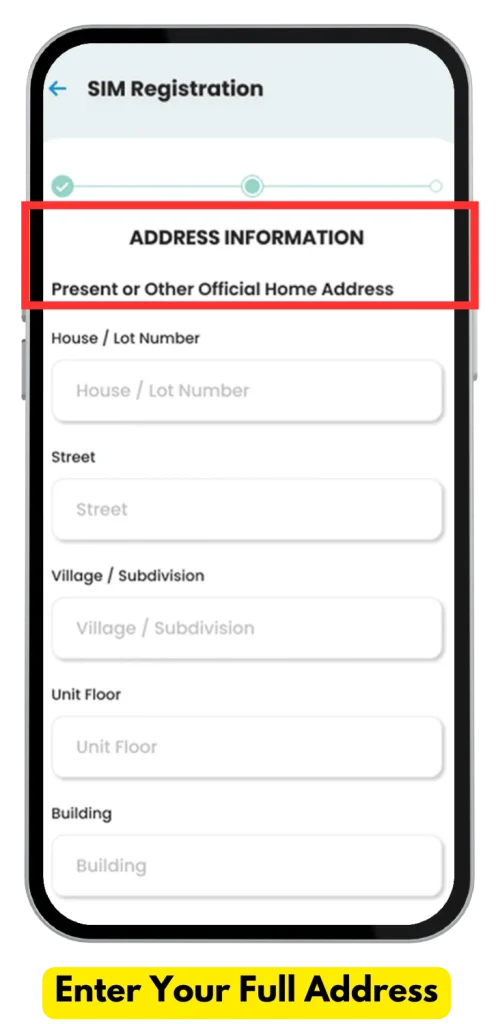
Step 5: Enter Full Address
- Enter your full address that should match to your provided ID card
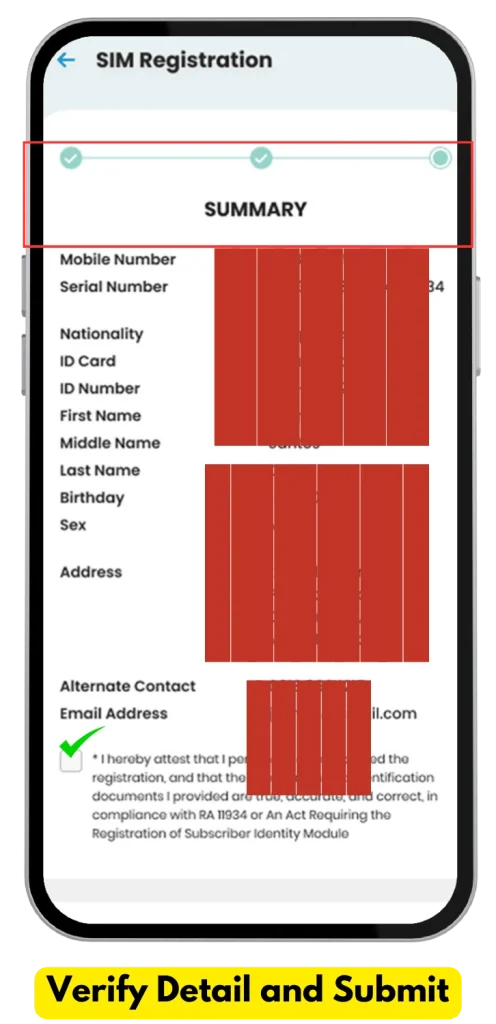
Step 6: Review and Submit
you are almost done!
- On the summary page, double-check all the information is accurate.
- Confirm that the uploaded photos are clear and legible.
Tap “Submit” and wait for the confirmation screen. You will see “Control Number”. Save it for the Future as a TNT Registration number.

Common Mistakes to Avoid When Registering via the GigaLife App
- Blurry ID Photos: Ensure your ID is clear and readable.
- Wrong Personal Details: Double-check your name, birthdate, and address.
- Incomplete Submissions: Make sure all fields are filled out before submitting.
TNT SIM REGISTRATION IN STORES
How to Register Offline?
No internet? No problem! You can still register your TNT SIM offline:
- Visit your nearest TNT retail store or service center.
- Bring a valid government-issued ID and your mobile number.
- Ask the staff to assist with your registration—easy peasy!
Offline registration is just as secure and efficient, especially for those who prefer in-person assistance.

Registration via SMS or 123#
For users with basic phones, TNT offers SMS registration.
Steps:
- Dial *123# and follow the prompts.
- Alternatively, text your details to the specified TNT registration number.
Troubleshooting Common Issues
During registration few issues may arise, but there is nothing to worry about as they are very common issues, and you can troubleshoot them easily by yourself.
TNT SUPPORT:
If you have tried all the troubleshooting steps and the problem is still not resolved, You may contact TNT customer support via the Smartapp/GigaLife App or hotline..
- SMART hotline: (02) 8 888-1111
- Toll-free via Smart SIM: *888
- Facebook: @TNTPh
- Twitter: @tntph
| Error | Reason | Solution |
|---|---|---|
| Invalid OTP | Incorrect or expired code | Request a new OTP and enter it immediately. |
| Document Upload Fails | File size too large or poor quality | Resize and retake photos in a well-lit setting. |
| Personal Info Mismatch | Typo or incorrect details entered | Review your form and correct errors. |
| Website Down/Glitches | Too many users at once | Try again during off-peak hours. |
TNT SIM Registration Verification
How to check if Your TNT SIM is Registered?
- Dial *123#: Dial *123# on your mobile.
- Select the Registration Option: From the menu, choose the option related to SIM registration or account services.
- Follow the On-screen Instructions: Carefully follow the on-screen prompts to check your registration status.
You can check the registration status by visiting the official TNT Smart website.
2- Visit the TNT Website: Go to the official TNT website and enter your mobile number. Registration should appear in front of your number.
3- Contact Customer Support: If you’re unsure, call TNT’s customer service or hotline for assistance.
Required Documents for SIM Registration TNT
Requirements for TNT SIM Registration
Before initiating TNT registration, ensure you have the following ready:
List of Accepted IDs
- Passport
- Driver’s License
- National ID
- Social Security System (SSS) ID
- Professional Regulation Commission (PRC) ID
- Senior Citizen’s Card
Additional Information Needed
- Full name, date of birth, and address.
- A recent selfie for identity verification.
TNT SIM Registration for Special Cases
Foreigners and Tourists
Foreign nationals can register TNT SIM cards by providing the following:
- Passport
- Proof of address in the Philippines
- Visa or permit details (e.g., student visa, work visa).
Minors Without IDs
- Minors can register with a parent or guardian’s ID and a signed consent form.
💡For minors, a parent or guardian’s ID and consent are required.
Promos of TNT
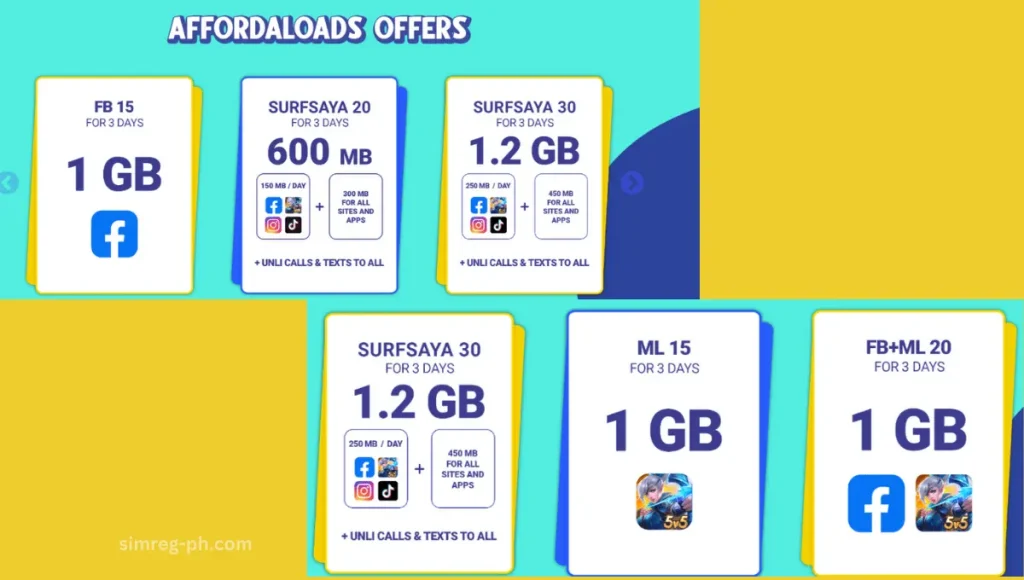
Registered users enjoy multiple benefits during work days as well as during holidays to stay fully connected.
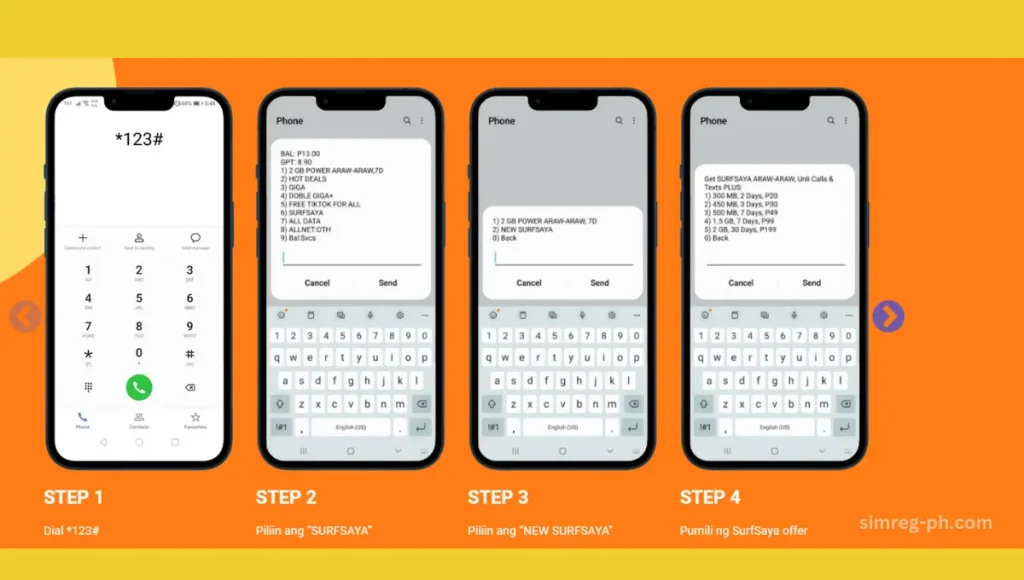
Exclusive Promos for New TNT SIM Users
New TNT SIM card users can enjoy exciting promos and freebies as a warm welcome to the network. Here are some of the current offers available:
|
Promo Name |
Description |
Validity |
Activation Method |
|---|---|---|---|
|
Welcome Bonus |
Free 1GB data upon activation |
3 days |
Automatically credited after registration. |
|
GIGA Video 50 |
1GB data + 1GB daily for videos (YouTube, iFlix, etc.) |
3 days |
Dial *123# and select GIGA Video 50 |
|
All-Net Calls 30 |
Unlimited calls to all networks |
1 day |
Text CALL30 to 4545 |
These promos ensure new users get the best experience right from the start. Don’t miss out—activate and enjoy!
How to Activate TNT SIM
When you enter your SIM card in mobile, it should be automatically activated but it it does not activate then follow adjust setting:
Activate TNT SIM
To activate your TNT SIM card, follow these easy steps:
- Visit the TNT registration site: tntph.com or simreg.smart.com.ph.
- Enter your TNT mobile number.
- Agree to the terms, conditions, and privacy policy.
- Receive an OTP via text, then enter it on the registration portal.
- Complete the form and upload a valid government ID.
- Take a selfie for verification.
- Screenshot your control number and wait for confirmation via text.
Activate TNT eSIM
- Scan the eSIM QR code sent to you in email.
- Scan the QR code with your mobile QR scanner or Camera- it will take you to the official website
- Register at smart.com.ph/simreg by completing the form and requirements.
How to Activate TNT MNP SIM
- Open your phone’s dialer and dial *123#.
- Select “3. Activate MNP & Other Services.”
How to Activate TNT SIM Card 5G
What is 5G-Ready TNT SIM?
A TNT 5G-ready SIM is a prepaid SIM card that can be used with TNT’s 5G network. 5G is already rolling out in some areas of the country; it would be a great deal to get a TNT 5G-ready SIM card to prepare for the future. 5G is offering speeds up to 10 times faster than 4G/LTE.
💡To enjoy 5G, you need a 5G-ready device and a TNT SIM activated for use on 5G networks.
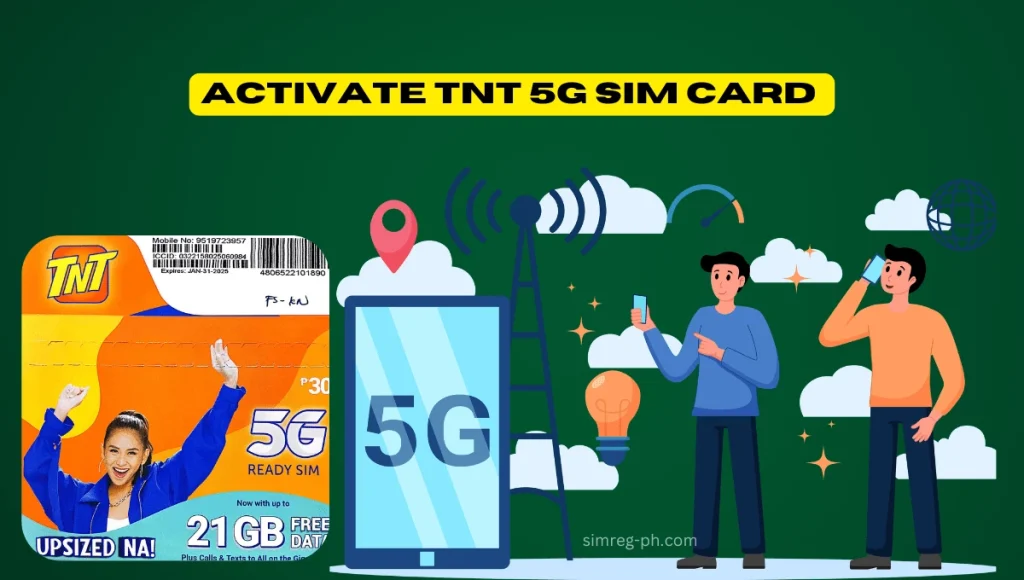
Step-by-Step Guide to Activate Your TNT 5G SIM
Insert Your TNT SIM into Your 5G-Capable Device
- Ensure your phone is compatible with 5G technology.
- Insert the TNT SIM into your phone’s SIM card slot.
Method# 1 Activate Using Mobile Data
- Turn on mobile data and open your phone’s browser.
- Visit the TNT website by typing www.tntph.com.
- Once connected, you’ll receive a Welcome SMS confirming that your SIM is active.
Method#2:Activate via 123#
- Open your phone’s dialer and type *123#.
- Follow the menu prompts to navigate to the “SIM Activation” option.
- Wait for the activation confirmation message.
Method# 3:Activate via SMS
- Send 15001 to 214 from your phone.
- You’ll receive a reply confirming your SIM activation, along with details about your balance and plan.
How to Check if Your TNT SIM is 5G-Ready
- Dial *123# and navigate to “Network Options.”
- Check the “5G Compatibility” section to confirm if your SIM is ready for 5G.
- Alternatively, visit the GigaLife App and check your account details.
Benefits of TNT 5G SIM
- Ultra-fast speeds: Stream HD videos, play online games, or download large files in seconds.
- Low latency: Enjoy a smoother connection for real-time activities like gaming or video calls.
- Future-proof technology: Be ready for advancements in mobile internet.
Tips for a Smooth Activation
- Ensure a strong signal: Perform activation in an area with good TNT network coverage.
- Check your device settings: Make sure 5G is enabled under your phone’s mobile network settings.
- Keep your SIM active: Top up your load regularly to maintain service.
After activation, TNT often rewards new users with 200MB of free Facebook access, valid for 15 days. To claim this, text UROWN to 4545 and choose FBREE.
Why Is TNT SIM Registration Important?
Why should you even bother with SIM registration?
According to the SIM Card Registration Act in the Philippines, all mobile users are required to link their SIM cards to their identity. But it’s not just about compliance; there are other benefits for SIM registration TNT:
Security.
CONCLUSION
As promised, you should be now clear that in order to enjoy uninterrupted data, calls and text service, you have to register your TNT SIM card in the Philippines. You can choos any option to register TNT SIM according to your choice. Registration requirements are almost similar whether you register your Talk ‘N Text“ via the TNT website and online link, GigaLife app, Smartapp or by visiting any nearby Smart store;
I would recommend you stay proactive, register a new SIM card as soon as you purchase it. To avoid any trouble, keep your ID and personal information in hand. Ensure to upload clear pictures of ID and Selfie and register in off-peak hrs for faster processing. Reach out to TNT, Smart customer support for any immediate help through GigalifeAPP, Smart app or hotline.
Frequently Asked Questions
TNT Regular SIM
- A physical SIM card needs to be inserted into your phone.
- Traditional registration process.
TNT E-SIM
- Embedded SIM technology requiring no physical card.
- Activation and registration are done online.
Yes, absolutely! You can register multiple SIMs under your name, You should Click “Add account” and repeat the process for each number.
Yes, Dial *123# and follow the prompts. However, it is not recommended for hassle-free TNT SIM registration. Visit the official Smart telecom website simreg.smart.com.ph, Use the TNT app, or visit the Smart store.
- A TNT 5G-ready SIM is a prepaid SIM card that can be used with TNT’s 5G network.
- TNT 5G-ready SIMs work seamlessly with 5G, 4G/LTE, 3G, and 2G devices.
- These SIMs allow access to TNT’s Unlimited 5G data offers, available in various packages with different validity options.
Foreigners and Tourists
Foreign nationals can register TNT SIM cards by providing the following:
- Passport
- Proof of address in the Philippines
- Visa or permit details (e.g., student visa, work visa).
Minors Without IDs
Minors can register with a parent or guardian’s ID and a signed consent form.
- Dial *123#
- You will get a complete list of TNT promos. Choose the TNT promo offer you want ·
- Select SUBSCRIBE.
- Then, SEND to confirm your registration.