DITO SIM Registration Guide
If you’re a DITO Telecommunity user or planning to buy a DITO SIM, registration of your sim is mandatory. Starting from the implementation of the SIM Registration Act, all SIM users in the Philippines are required to register their SIM cards to ensure better security and connectivity. Whether you’re a new subscriber or an existing one, this guide will walk you through everything you need to know about registering your DITO SIM. And don’t worry—it’s simpler than it sounds!
What is DITO SIM Registration, and Why Does it Matter?
First, a quick background—DITO Telecommunity is one of the top players in the Philippines’ telecommunications space, offering affordable services and reliable connectivity. To comply with the Philippine government’s SIM Registration Act (or Republic Act No. 11934), all SIM card users must now register their SIM cards.
Why?
Good question!
The main goal is to reduce the misuse of unregistered SIMs for scams and illegal activities. It also helps improve communication security, which is a win for everyone. SIM registration is a nationwide step towards responsible, secure mobile use.
The registration process for DITO SIM is similar to Globe SIM registration and TNT SIM registration.
Who Needs to Register a DITO SIM?
- Whether you’re a new subscriber or have been using DITO for a while, you’ll need to register your SIM.
- All prepaid user, postpaid and broadband users are required to register with DITO SIM to enjoy seamless services.
Here’s the breakdown of who should register:
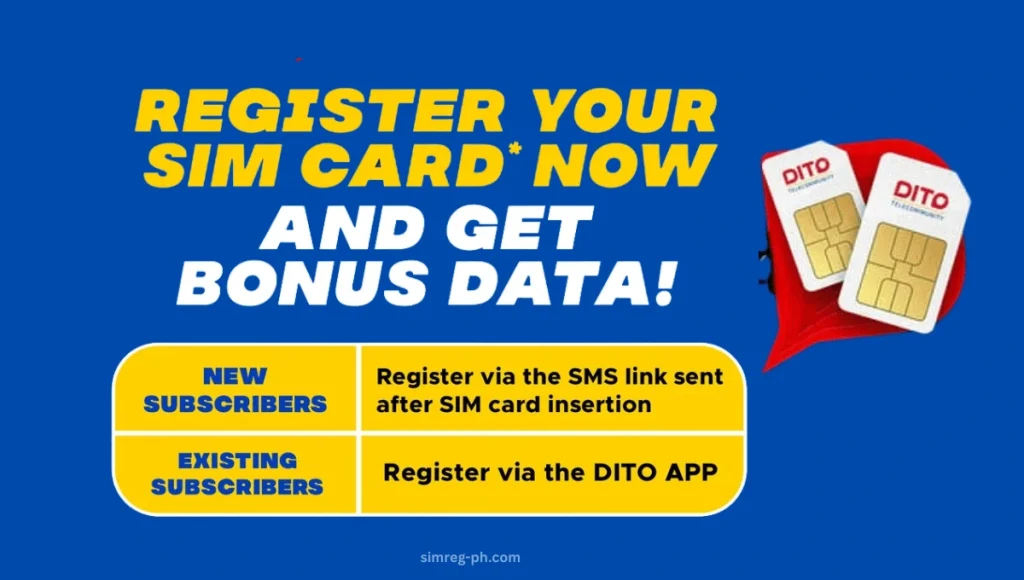
New Subscribers: If you’ve just purchased a DITO SIM card, registration is required before it can be activated.
Existing Users: Already enjoying DITO’s services? You still need to register your SIM to continue using it.
What Do You Need for DITO SIM Registration?
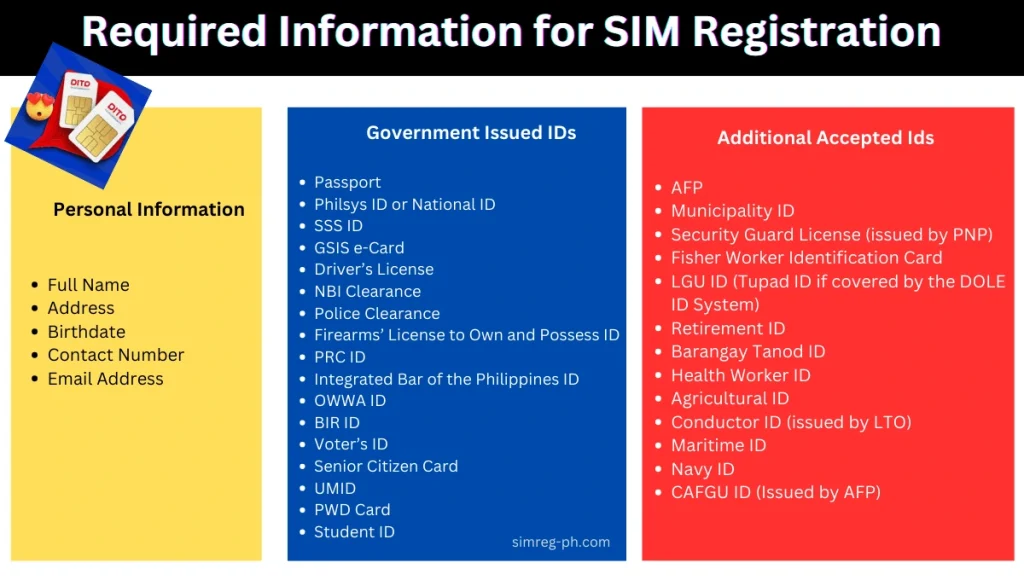
Before you start the registration process, make sure you have below information and documents handy.
Personal Information:
Accepted Government-Issued IDs (For Identity Verification):
Just pick one of the IDs listed above and ensure it’s valid and updated.
Special Cases in DITO SIM Registration
For some users, additional steps may apply. If you fall into any of the categories below, don’t worry—we’ve got you covered!
If your business is using shared SIMs, it’s important to have the registration done by someone who’s an authorized representative.
This person will need to provide proof of their authority, along with the company’s registration documents and their ID to complete the process smooth and simple!
How to Register Your DITO SIM
DITO SIM registration is mandatory to enjoy its smooth services and comply with government regulations. DITO provides multiple options to complete your sim registration quickly and hassle-free
Whether you prefer to register for DITO SIM using your smartphone through an official link or DITO APP or by seeking help from a physical store, DITO Telecom has covered you all.
Methods to Register DITO SIM
I will provide you with the detailed steps and requirements for completing your DITO SIM registration. Please note that there are three convenient methods available for registration. We will explain each in easy steps, and you can choose any one of your choices.
- To avoid unnecessary complications during the registration process, ensure that your phone is compatible with DITO SIM and you have an uninterrupted internet connection.
- DITO SIM Registration via the DITO App
- DITO SIM Registration Online Link- Official Website
- DITO SIM Registration via SMS
1- DITO SIM Registration via the DITO APP

The DITO App is the most convenient option for most users to register their sim from the ease of their sofa.
Follow these step-by-step instructions for registration of your DITO sim via DITO APP:
Download and Install the DITO App through Google Play if you are using Android or Apple App Store in case of using iPhone.
- Login to Your Account: Open the app and log in with your DITO account credentials. If you you dont remember the password, click forget password and select sign in via sms.
- Start the Registration Process: On the dashboard, click the “Register Here” icon.
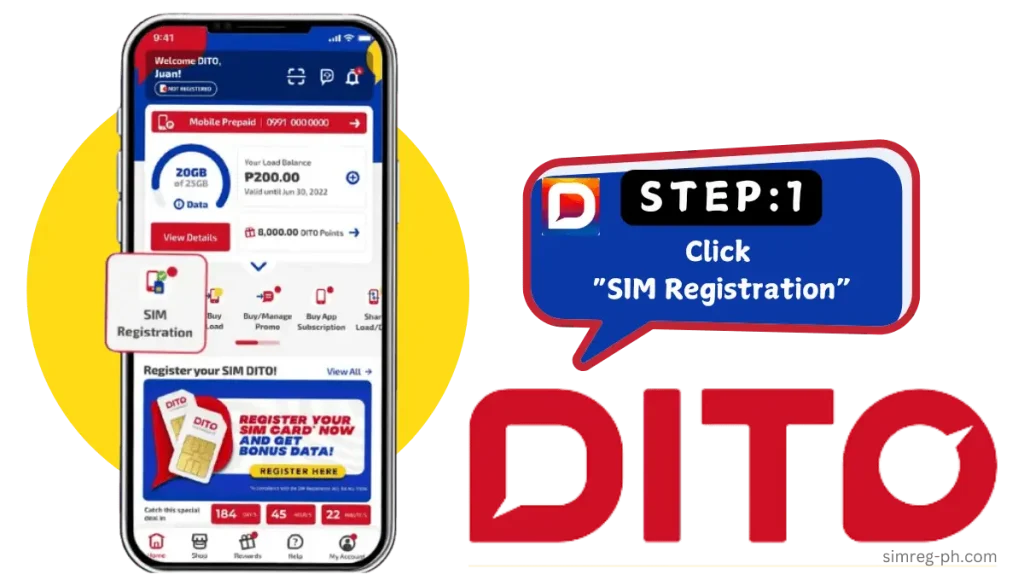
Select your identity type: from the drop-down menu, choose your Identity type (e.g., Filipino, Minor, Foreign National)
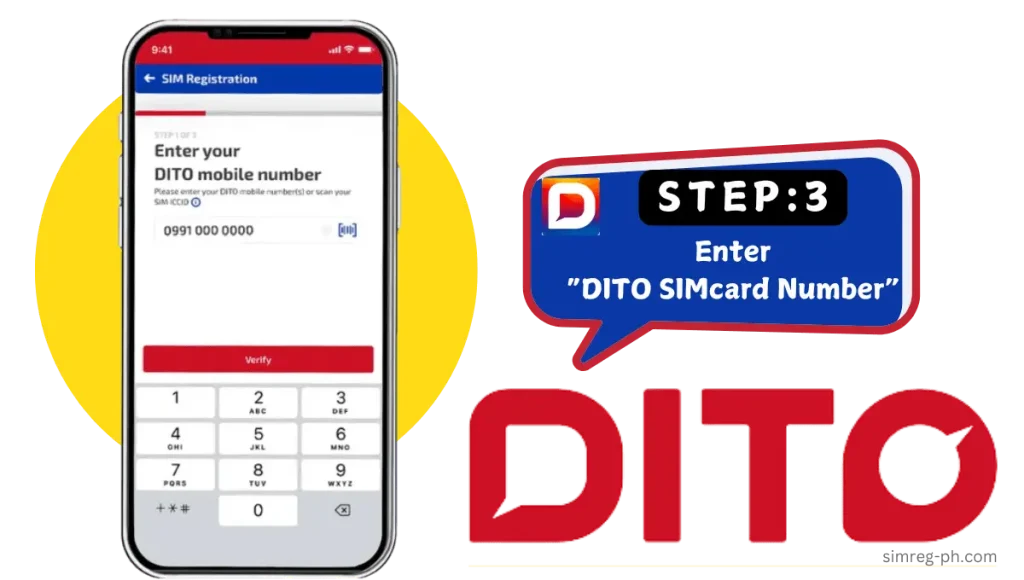
Enter your mobile number.
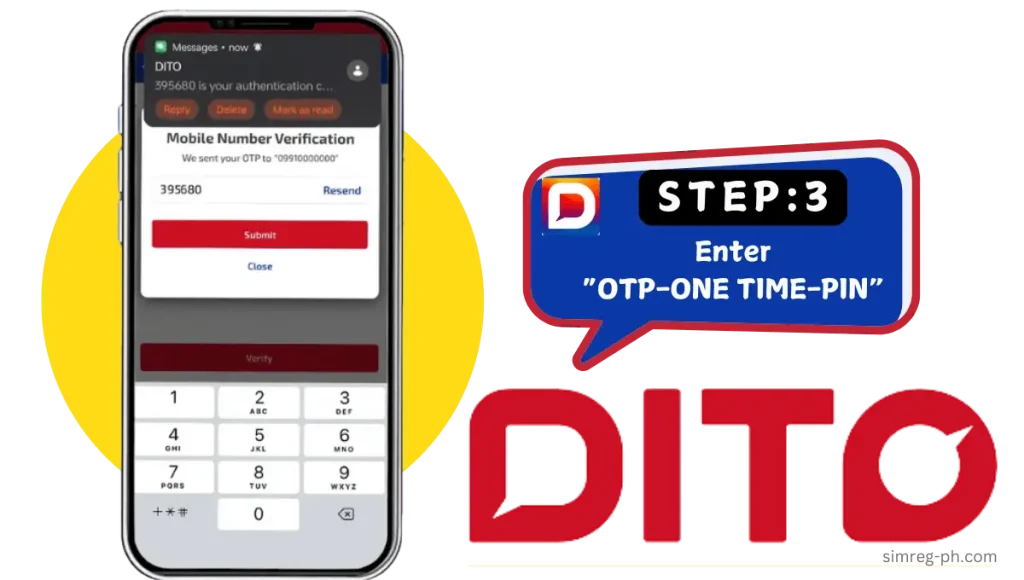
Verify Your Mobile Number: Click on “Get OTP” and wait for the One-Time Password (OTP) via SMS.
- Enter the OTP to complete the verification.
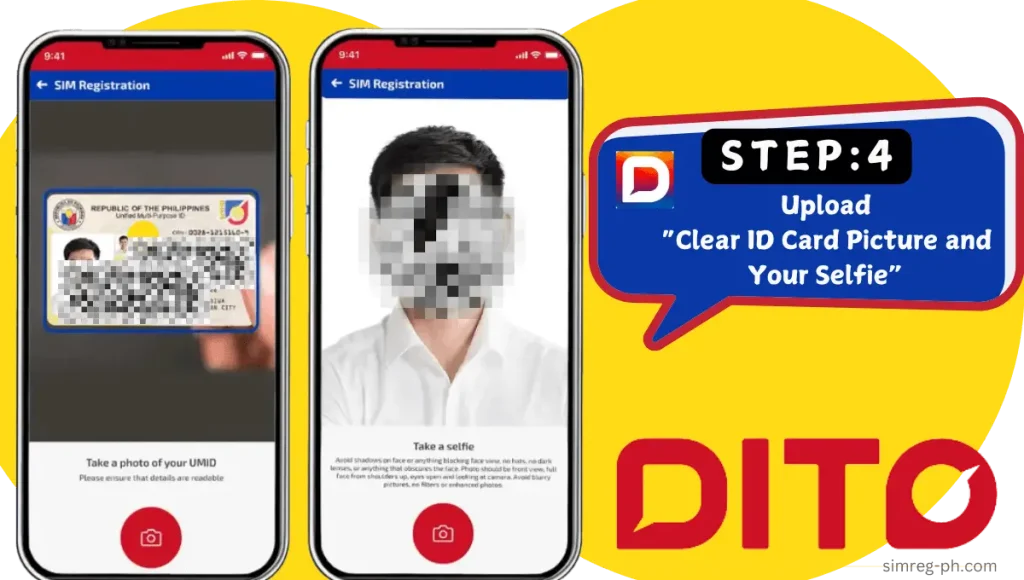
Upload Identification Documents
- Upload a clear image of your government-issued ID (taken directly or from your phone gallery).
- Take a selfie or upload a clear image from your gallery.
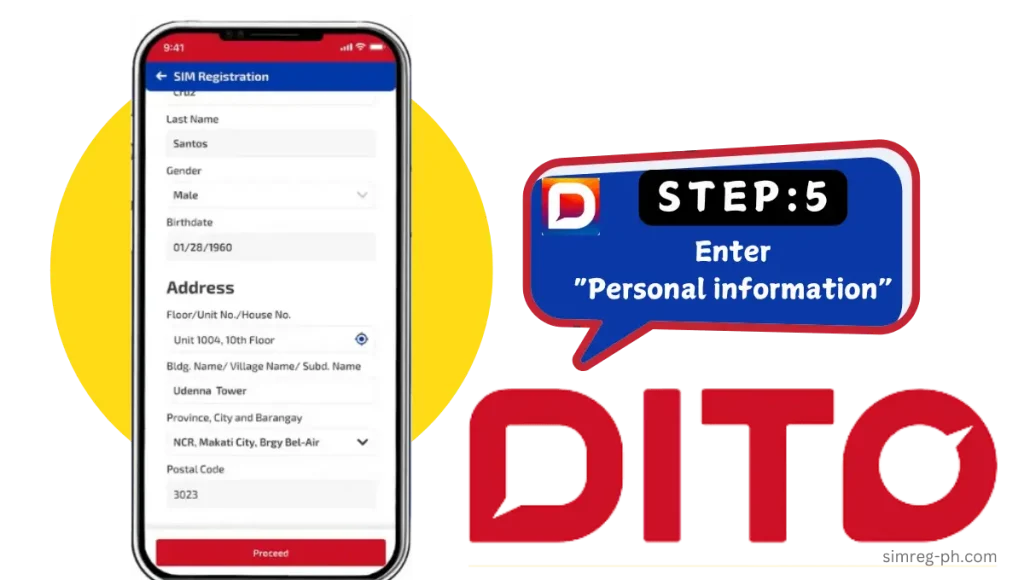
Enter Your Personal Information: Fill up the DITO SIM registration form with the required details, such as your full name, date of birth, gender, address, city, and zip code.
Enter Your Personal Information Fill up DITO SIM registration form with required details such as your full name, date of birth, gender, address, city, and zip code.
Complete the Process
- Review the information and ensure all information is accurate and matches the ID card.
- Agree to the terms and click “Submit.”
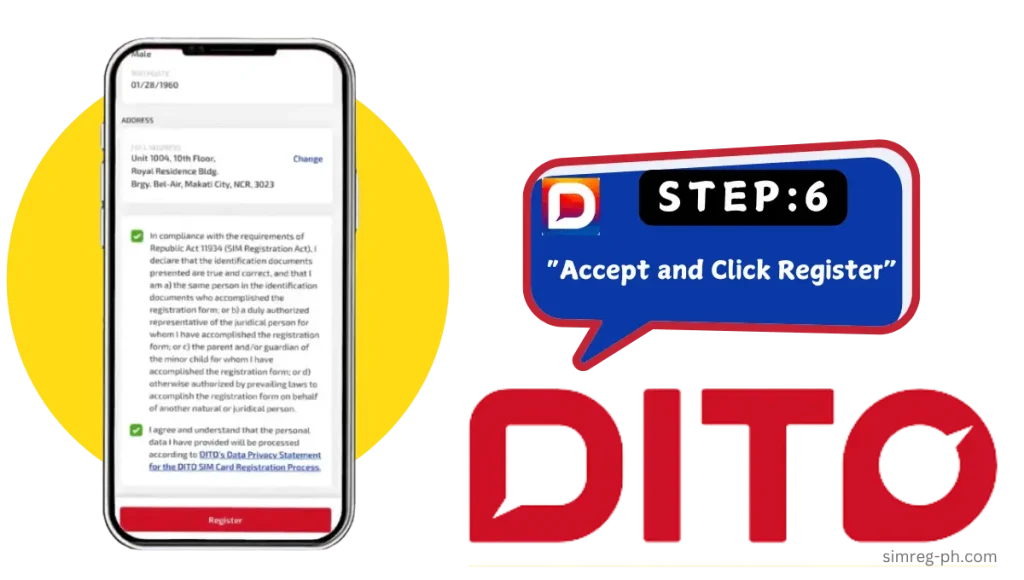
Congratulations! Your DITO SIM has been successfully registered using the DITO App.

2. DITO SIM Registration Online Link-Official Website
If you dont have DITO App already installed and prefer using a web browser, you can register your DITO SIM through the official website. Follow these instructions:
Visit the DITO Website
- Go to the DITO SIM registration link online: https://register.dito.ph.
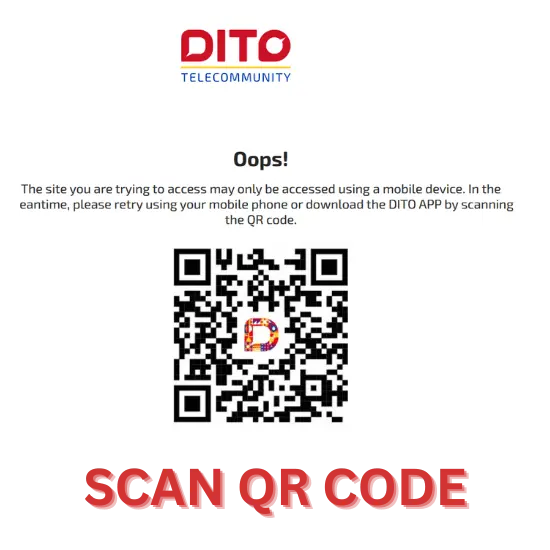
Scan the DITO QR code:
- Once you visit the official site, you will see the DITO QR code. Scan the DITO SIM QR code provided on the site. This will redirect you to download or open the DITO App.
Complete the Registration in the DITO App
- Follow the same steps for app-based registration.
- Ensure all required documents and information are ready.
Your registration is completed via the DITO website and app.
3. DITO SIM Registration via SMS
If you are a new user, you can register your new DITO SIM via SMS. Once you enter your SIM into your mobile phone, you will receive instructions to register a DITO SIM. For users without access to the app or website, registration by SMS is a simple alternative. Here’s how:
Insert Your DITO SIM into Mobile:
- Insert the new DITO SIM into your mobile device.
- Wait for the activation of your DITO SIM; it may take a few moments.
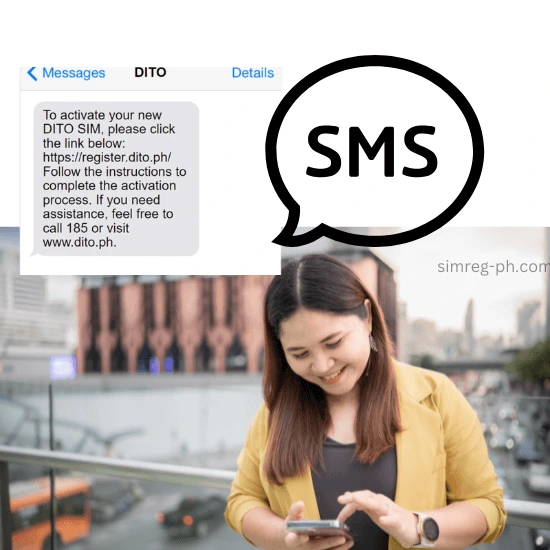
Check the Message from DITO
- DITO will automatically send a message with a DITO SIM registration link.
Click the Registration
- Click the link in the message and fill out the DITO SIM registration form by entering your details, including your name, address, and ID number.
- Verify your OTP via SMS.
Review “Summary detail”: On review Summary Detail section, if it is correct, then “click register.”
Click “Register” to complete the process.
Your registration is now completed.
How to Activate DITO SIM
If you have purchased a new DITO SIM card and are wondering how to actvate a DITO SIM card and set up APN (AccessPoint network), then no need to fret. DITO SIM activation and APN setup is a simple 4 step step process.
Follow the steps below to activate DITO SIM:
If your phone is not compatible with DITO, you can make your phone compatible by setting the APN manually. These few steps can turn your phone from non-compatible to compatible with DITO:
Step 1:
Start by inserting your new DITO SIM into your phone.
Step 2:
Go to the Settings menu on your phone and select Mobile Network. Then, tap on Access Point
Step 3:
Click the Add button. Enter internet.dito.ph in the provided field and tap Save to confirm.
Step 4:
Enable your mobile data. Once your SIM card is activated, you will receive a welcome SMS and an email. These will include a link to download the DITO App along with your initial login password.
Tips for Hassle-Free Registration
Follow these tips to avoid common registration issues:
- Ensure Clear Photos: ID card picture and selfie photos should be high quality and less than 2MB in file size.
- Double-Check All Information: Accuracy of provided information is essential to for smooth registration.
- Stable Internet Connection: A reliable connection ensures smooth uploading of files and completion of forms.
DITO SIM Compatible Phone List
If you’re looking to use a DITO SIM, it’s essential to know which mobile phones are compatible with the network’s 4G and 5G services. DITO, a leading telecommunications provider, offers extensive coverage with high-speed data services.
Here’s a list of the DITO compatoble mobile devices that work perfectly with DITO SIM cards DITO, categorized into 4G/LTE and 5G-supported smartphones.
4G/LTE Compatible Mobile Phones with DITO SIM
| Brand | Model(s) |
|---|---|
| Cherry Mobile | Cherry Mobile Flare series, Cherry Mobile Aqua |
| Google Pixel 4, Google Pixel 4a, Pixel 5 | |
| Honor | Honor 9X, Honor 20, Honor 30 Pro |
| Huawei | Huawei P30, Huawei Mate 20, Huawei Nova 5T |
| Infinix | Infinix Zero 8, Infinix Note 7, Infinix Hot 10 |
| itel | itel A56, itel Vision 1, itel P33 |
| MyPhone | MyPhone Agua, MyPhone Rio, MyPhone Uno |
| narzo | narzo 20, narzo 30A, narzo 50A |
| Nokia | Nokia 7.2, Nokia 5.3, Nokia 6.2 |
| Nubia | Nubia Z20, Nubia Red Magic 5G |
| Oppo | Oppo A53, Oppo Reno3, Oppo F19 Pro |
| Poco | Poco X3, Poco M3, Poco F3 |
| realme | realme 6, realme Narzo 30, realme X2 |
| Samsung | Samsung Galaxy A12, Galaxy M32, Galaxy S20 FE |
| TCL | TCL 10L, TCL 10 Pro, TCL 20 Pro |
| Tecno | Tecno Camon 16, Tecno Spark 6, Tecno Pova |
| Vivo | Vivo Y20, Vivo V21, Vivo V17 Pro |
| Xiaomi | Xiaomi Redmi Note 10, Xiaomi Mi 10, Mi A3 |
| ZTE | ZTE Blade A7, ZTE Axon 11, ZTE Blade V10 |
5G Compatible Mobile Phones with DITO SIM
| Brand | Model(s) |
|---|---|
| Cherry Mobile | Cherry Mobile Aqua S10 Pro (5G) |
| Google Pixel 5, Google Pixel 6, Pixel 6 Pro | |
| Honor | Honor 50, Honor V40, Honor Magic 3 |
| Huawei | Huawei Mate 40, Huawei P40 Pro, Huawei Nova 8 |
| Infinix | Infinix Zero 5G |
| itel | N/A |
| MyPhone | N/A |
| narzo | narzo 50 5G |
| Nokia | Nokia X20, Nokia X10, Nokia 8.3 5G |
| Nubia | Nubia Red Magic 5G, Nubia Z30 |
| Oppo | Oppo Reno 5G, Oppo Find X3 Pro, Oppo A74 5G |
| Poco | Poco F3, Poco M3 Pro 5G |
| realme | realme GT, realme 8 5G, realme X50 5G |
| Samsung | Samsung Galaxy S21, Galaxy A32 5G, Galaxy Z Fold 3 |
| TCL | TCL 20 5G, TCL 10 5G |
| Tecno | Tecno Pova 2 5G |
| Vivo | Vivo V21e 5G, Vivo Y72 5G, Vivo X60 Pro 5G |
| Xiaomi | Xiaomi Mi 11, Redmi Note 10 5G, Mi 10T Pro |
| ZTE | ZTE Axon 20, ZTE Axon 11 5G |
For more detail on DITO compatible phones you can visit offical site : https://dito.ph/compatible-handsets
Final Thoughts
I have discussed all methods with step-by-step instructions for DITO SIm registration. Whether you choose to register via online official link or via SMS , it will ultimately take you to the DITO APP.
With proper identification and verification through SIM registration, you can confidently use your DITO SIM for online transactions and payments. By having accurate information on file, DITO telecom will provide personalized services such as special promos and rewards,