TM SIM REGISTRATION
TM SIM REGISTRATION
If you are using a TM SIM card in the Philippines, registration of your SIM is mandatory under the SIM Registration Act. To support the law, Telecom has announced that failure to complete TM SIM registration can result in service interruptions and penalties.
To land directly on the official TM SIM registration link, Click below on the “Register Here” button or visit the link: https://new.globe.com.ph/simreg
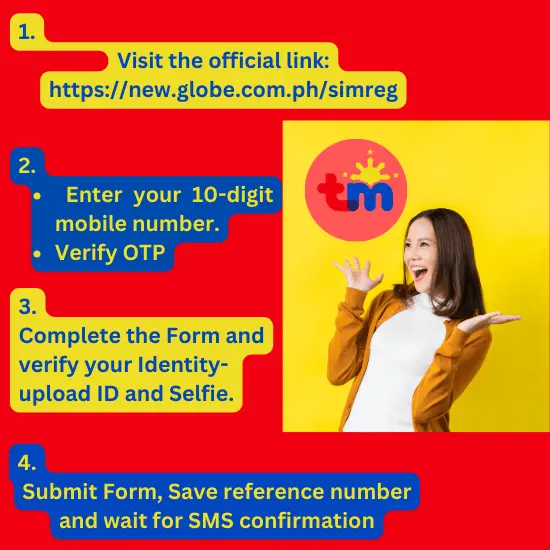
If you have purchased a new TM sim card, you might be wondering how to complete registration smoothly and quickly. This guide provides everything you need to know to register your TM SIM card smoothly, including requirements, step-by-step instructions, troubleshooting tips, and how to claim freebies..
Quick Steps:
What is TM SIM, and Why Do You Need to Register?
TM SIM is a brand of Globe Telecom.SWS survey proves the continuous efforts of Globe to provide secure and reliable services to its subscribers
A rapid increase in mobile data usage (reaching 4,360 petabytes) fueled by video and social media highlights the growing demand for Globe’s reliable and secure, data-focused services, and TM is the most affordable service with appealing promos and strong presence in rural areas that contribute to its widespread popularity among Filipinos.
Read About: Globe SIM registration Online
Scammers are haunting the Filipinos!
Along with the increased data usage, security threats emerged as well. And made it challenging for telecom companies to fight against scammers. Hence, every telecom service provider made SIM registration mandatory as per the Registration Act,
Who Can Register TM SIM?
Anyone who owns a TM SIM card should register it at the earliest for a secure online experience and to comply with the SIM Registration Act:
- Filipino Citizens: Individuals with valid government-issued IDs and personal details.
- Foreign Nationals: Tourists and residents with different visa types are also eligible for ™ SIM Registration by presenting their passports and supporting documents.
- Minors: If Minors purchase ™ sim card, Registration must be completed by a parent or guardian with valid identification.
- Enterprises: Businesses can register TM SIMs by providing official company documents.
How To Register TM SIM?
SIM Registration TM/Globe is mandatory under Philippine law. You can complete registration in a few steps.
Follow the steps below to ensure your SIM remains active and connected.
Telecom company has introduced various online and onsite options to complete the registration.
TM SIM Registration Online Link
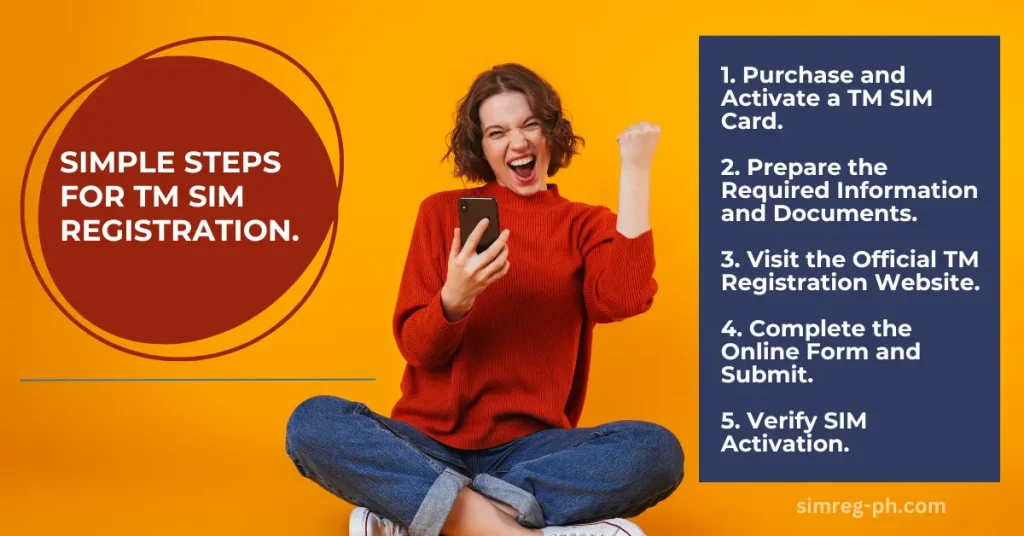
How to Activate TM SIM?
Method #1
Purchase a TM SIM card from an authorized retailer and follow the activation steps below to ensure your SIM is ready for registration and use.
Launch the message app on your mobile. Create a new message and Type “ACTIVATE.”
Send it to the “designated TM activation number.” Soon, you will receive a confirmation message from the TM service provider that your TM SIM card is now successfully activated.
Steps to Activate Your TM SIM ( Method# 2)
- Insert Your TM SIM Card
Place your new TM SIM into your phone’s SIM card slot. - Turn On Your Phone
Power on your device. You should receive a welcome message from TM confirming activation. - Troubleshoot If Necessary
- If you don’t receive a message, restart your phone or re-insert the SIM.
- Ensure the SIM is properly placed in the slot.
- Proceed to Registration
Once activated, follow the registration steps to comply with mandatory SIM registration laws.
Pro Tip
TM SIM Registration Online
Here is a step-by-step guideline for sim card registration online using the legit TM Registration online link.
Step 1: Visit the Official Globe Registration Portal
Visit the TM, Globe SIM Registration website:
Here is the official portal for registering TM, Globe SIM online. Verify you are on the official website to avoid scams.
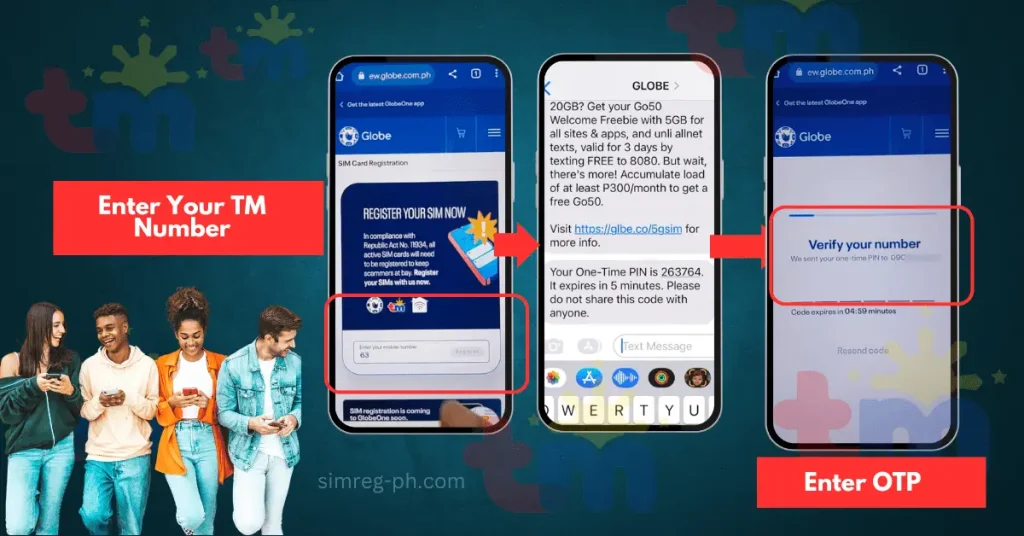
Step 2: Enter Your TM Number and Verify via OTP
- Enter the TM SIM card/ mobile number in the registration form.
- Click the “Register button.”
- Wait for a One-Time PIN (OTP) should be sent to your mobile number via SMS. (This may take up to 5 minutes.)
- Enter the OTP on the portal to verify your number.
💡 Pro Tip:
Ensure your phone has a good and stable connection to receive the OTP without delays.
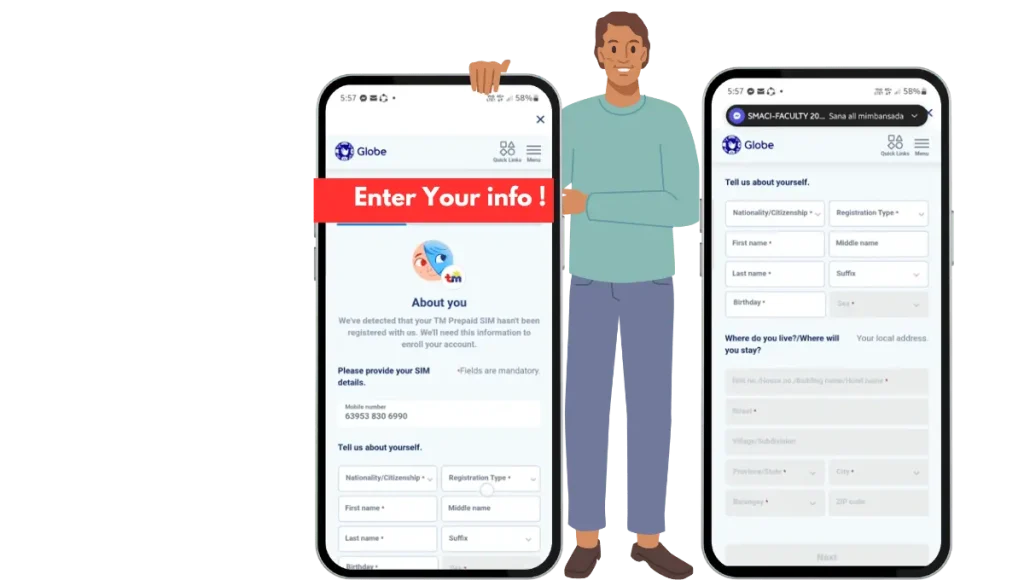
Step 3: Complete the TM Registration Form
Fill out the required personal details accurately:
- Enter Personal Information:
- Name/ Date of Birth, Address, and Gender
- Choose Nationality
- Registration Type (Select Owner)
💡 Pro Tip:
Verify your details for accuracy. Then click “Submit” to move to the next step.
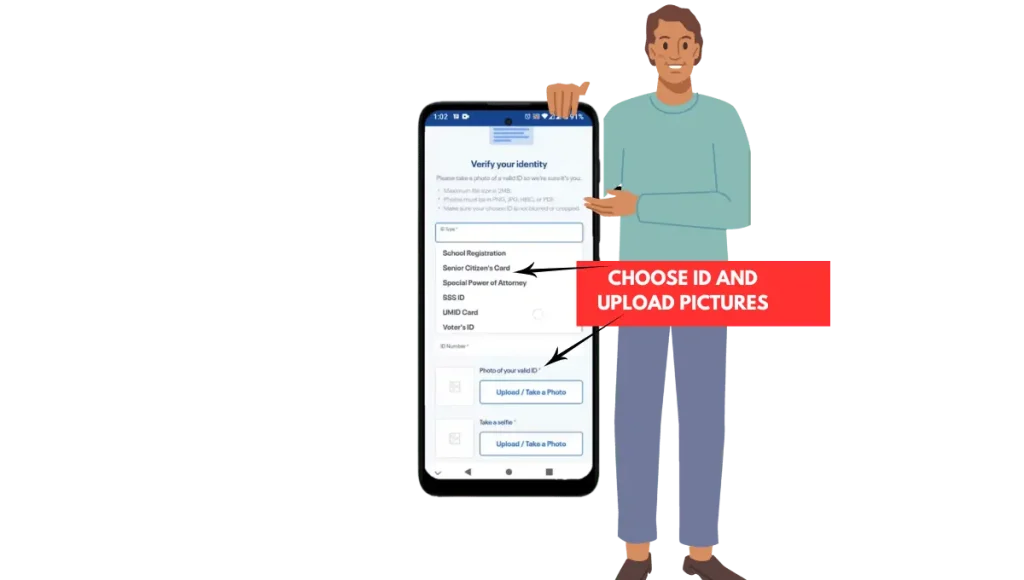
Step 4: Verify Your Identity
- Select a valid government-issued ID from the drop-down list:
- Philippine National ID
- Passport
- Driver’s License
- Upload a picture of your ID.
2. Take and upload selfies for identity verification.
💡 Pro Tip:
Ensure both the ID photo and selfie are less than 4MB.
Step 5: Accept the Privacy Policy and Submit
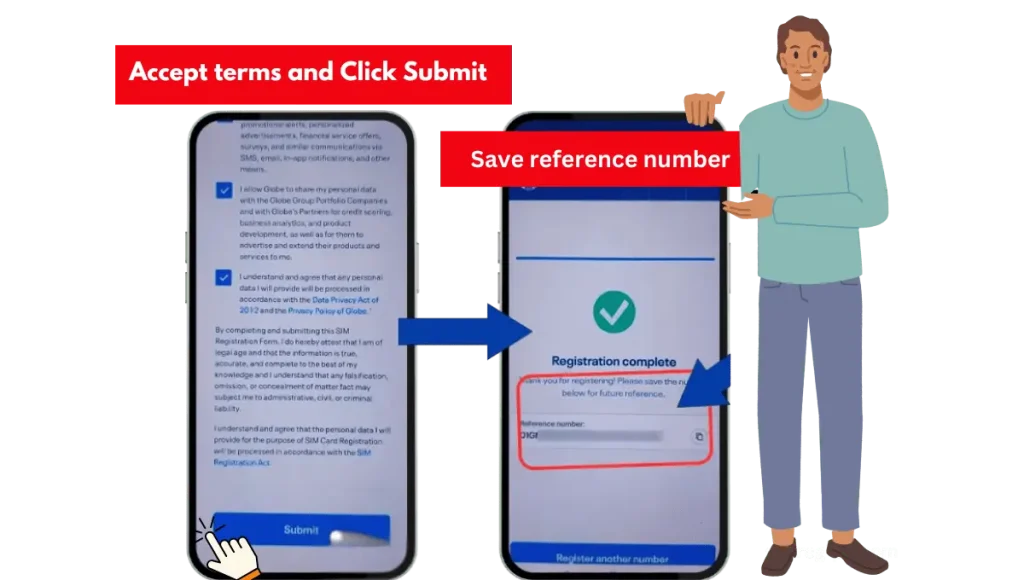
- Tick the privacy policy checkbox.
- Click Submit to finalize your registration.
You will receive a Reference Number upon successful submission. Save this number for future reference as proof of your registration also called TM registration number.
Globe One App SIM Registration
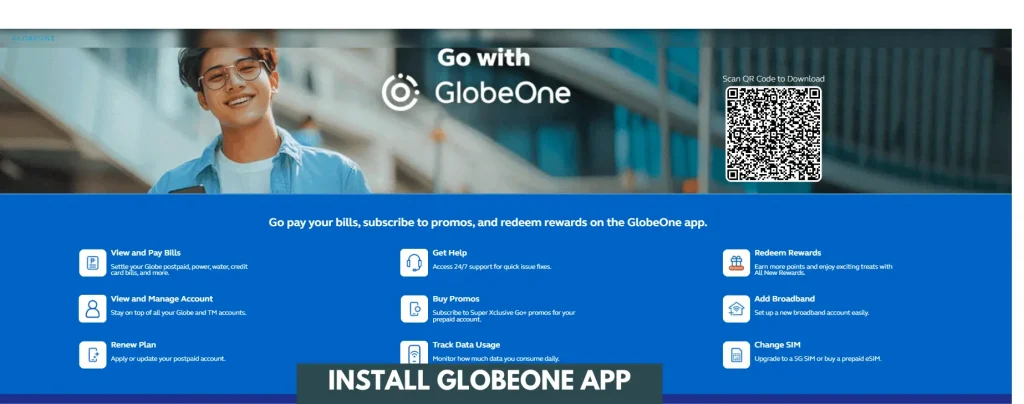
GlobeOne App is another convenient and mobile-friendly online method to register TM Sim.
You can follow the below steps to complete sim registration in short time.
Step-by-Step TM SIM Registration via GlobeOne App
1. Download the GlobeOne App
- Open the Google Play Store (Android) or App Store (iOS).
- Search for “GlobeOne App” and download it.
- Install the app and launch it on your phone.

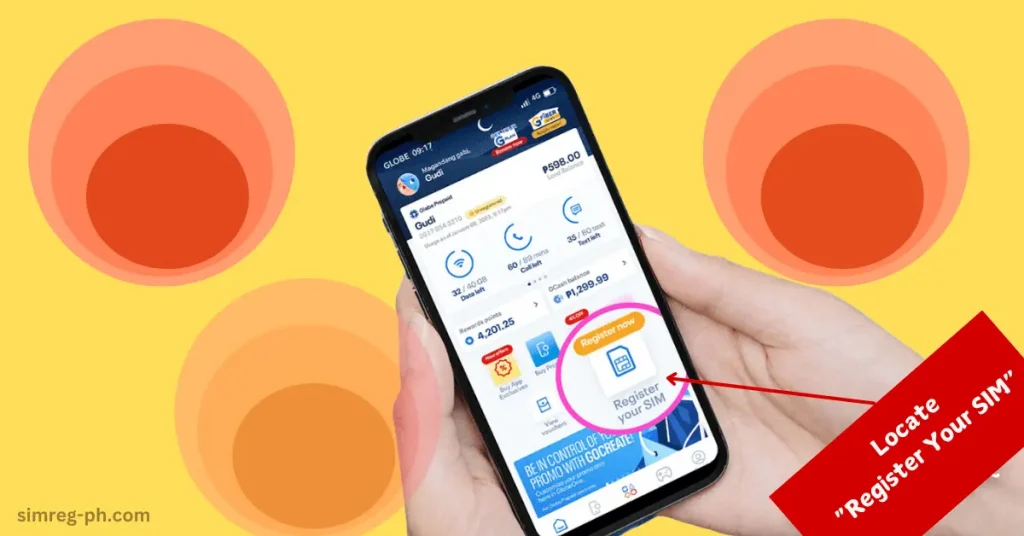
2. Locate “Register Your SIM“
- Open the app and locate the “SIM Registration” option on the homepage.
- Click on the “Register” button to proceed.
3. Enter your Mobile Number & Verify via OTP
- Enter your SIM/TM mobile number.
- Press “Register” to initiate the process.
- Accept cookies and proceed.
- You will receive a One-Time PIN (OTP) via SMS.
- Enter the OTP within 5 minutes to verify your mobile number.
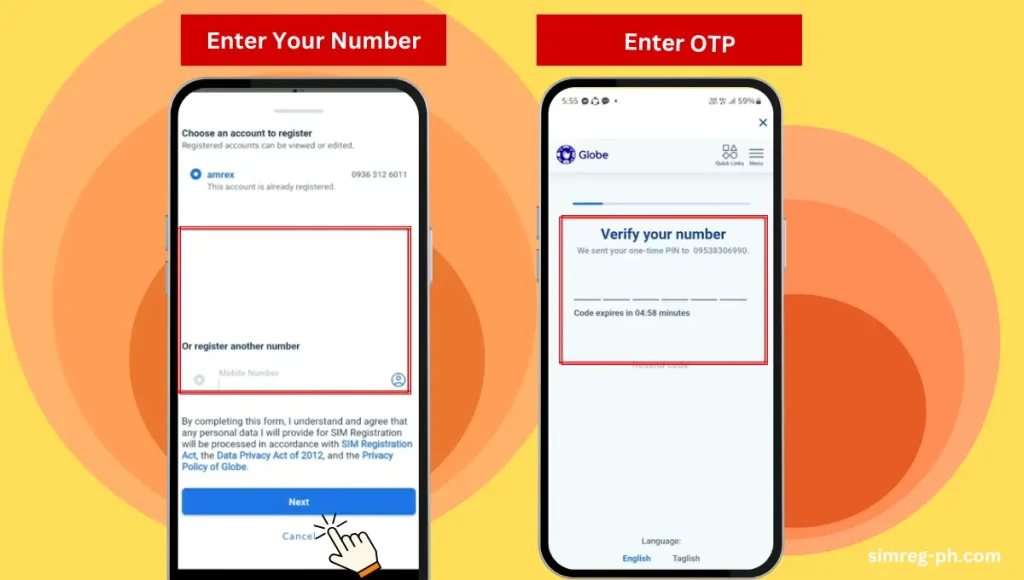
4. Provide Personal Information
Fill out the TM registration form with the following details:
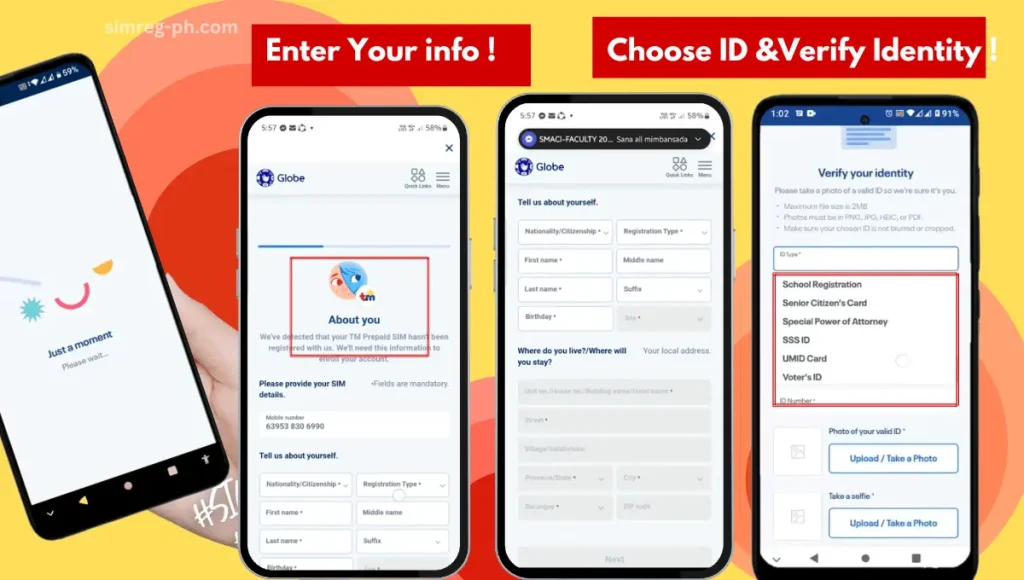
5. Identity Verification
- Select a valid ID Type (e.g., Passport, National ID, Driver’s License).
- Enter your ID Number and upload a clear photo of the ID.
- Take and upload your selfie to confirm your identity.
6. Accept the terms and conditions and click Submit
- Check the box to accept the terms and conditions.
- Click the “Submit” button to complete your registration process.
7. Save Your Reference Number
- Upon successful registration, you will receive a Reference Number.
- Save this reference number, as this is your TM registration number
Congratulations! You can enjoy uninterrupted services and many rewards.
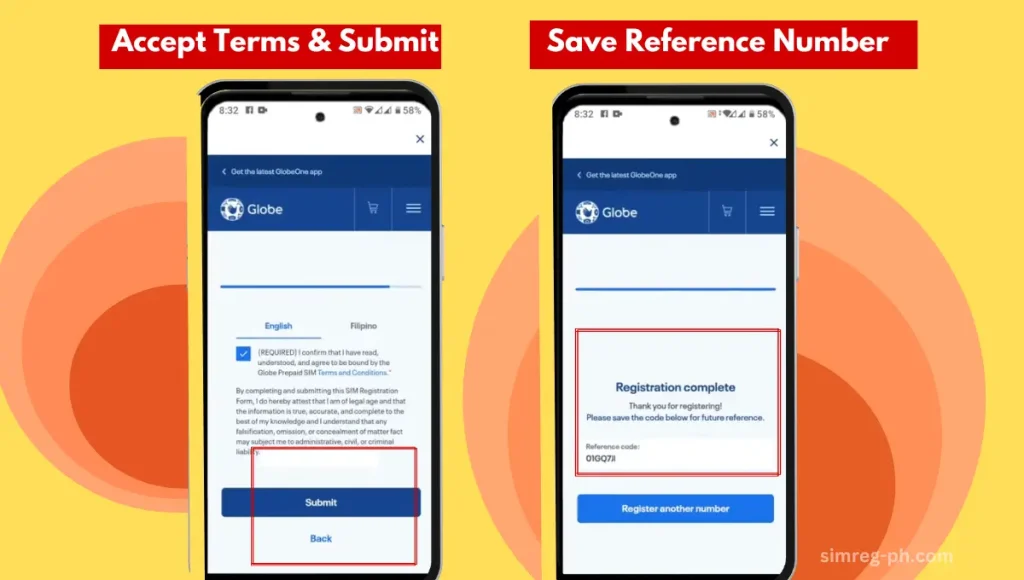
** All uploaded images (ID and selfie) should be less than 4MB. You can use any image compressor to reduce the size of the image.
** Ensure to use valid government-issued IDs for the process.
** Complete registration within the app to avoid scams and use only legit links.
Required Documents for TM SIM Registration
Acceptable IDs for Philippine Nationals for TM SIM Registration
Here’s the list of valid IDs you can use for TM SIM registration:
- PhilSys National ID (PhilID)
- Driver’s License
- Unified Multi-Purpose ID (UMID)
- Social Security System (SSS) Card
- Government Service Insurance System (GSIS) Card
- Senior Citizen’s Card
- Passport
- Police Clearance
- NBI Clearance
- Firearms License
- Professional Regulation Commission (PRC) ID
- Voter’s ID
- Postal ID
- PhilHealth ID
Tip: Ensure your ID is valid, legible, and matches the personal information you submit during registration.
Requirements for TM SIM Registration for Foreigners
List of Required Documents for Foreigners
To register your TM SIM, ensure you have the following documents ready:
- Passport – A copy of the bio page and pages showing your current visa.
- Proof of Address in the Philippines – Such as hotel booking, rental contract, or an affidavit from a host.
- Return Flight Ticket – Details of your departure date and time.
- Alien Certificate of Registration Identification Card (ACRI-card) – Issued by the Bureau of Immigration for long-term residents.
- Alien Employment Permit – For foreigners working in the Philippines, issued by the Department of Labor and Employment.
- School Registration & ID – If you’re an international student, these documents are required.
- Travel Documents for Persons of Concern (POC) – Issued by the Philippine Department of Justice.
TM SIM Registration Requirements for Companies
For registration of TM, Globe SIM under the company name, the following documents should be prepared by the company’s Authorized Representative. He can later use the Globe Business Bulk Registration Tool to complete the process with ease. Globe Telecom sends the requirement details only to the designated authority of the company.
Requirements
- Registered Company Name
- Company Address
- Full Name of Authorized Representative
- List of Company-Associated Mobile Numbers
Required Documents
-
- Proof of Business Registration, such as SEC Certificate (Partnerships, Corporations, Cooperatives, etc.)
- DTI Registration (for Sole Proprietorships)
- BIR Form 2303 (for LGUs, government agencies, foreign missions, etc.)
- Authorization Documents for Representative: Notarized Special Power of Attorney
- Notarized Board Resolution
- Department/Office Order (for government agencies)
- Valid IDs of the Authorized Representative: PhilSys National ID
- Driver’s License
- Passport
- UMID, SSS/GSIS Card, or other government-issued IDs
Note: Ensure all files are under 4MB, and a notary should notarize authorized documents.
Register Your TM SIM in Stores
Steps to Register TM SIM in Stores
- Visit any official TM store or an authorized retailer.
- Take a valid government-issued ID card along with you.
- Request attendee for assistance with SIM registration.
- Complete the form and registration process with the attendant’s guidance.
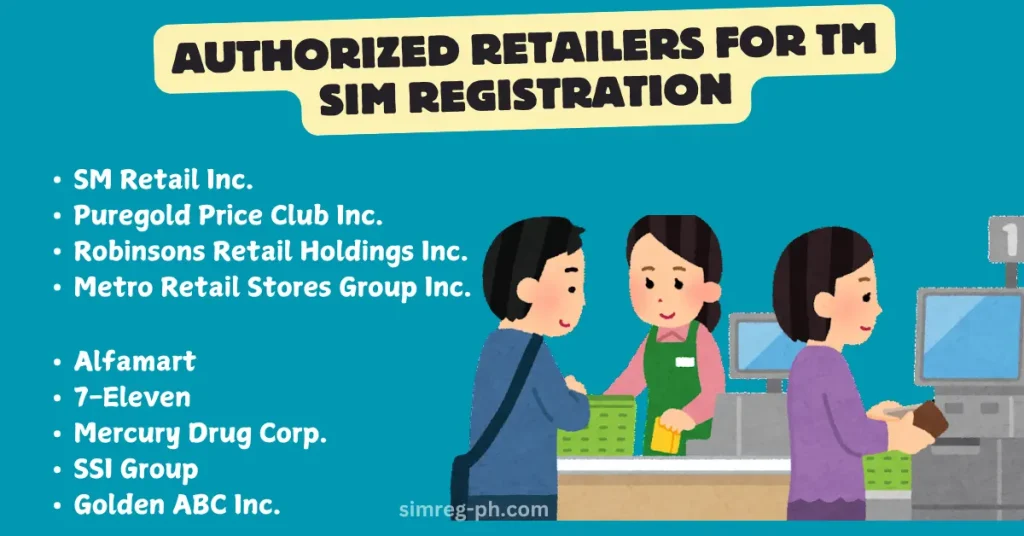
Authorized Retailers for TM SIM Registration
| Company Name | Additional Information |
|---|---|
| SM Retail Inc. | Nationwide branches available in major malls. |
| Puregold Price Club Inc. | Open daily, ideal for grocery shoppers can register their SIMs. |
| Robinsons Retail Holdings Inc. | Includes Robinsons Supermarket and department store locations. |
| Metro Retail Stores Group Inc. | Located in Cebu and Visayas regions; convenient for locals. |
| Alfamart | Small neighborhood stores: ideal for quick SIM registration. |
| 7-Eleven | Open 24/7; perfect for late-night or emergency registrations. |
| Mercury Drug Corp. | Includes branches near hospitals for easy access.. |
| Rustan Supercenters Inc. | Premium service and grocery offerings. |
| SSI Group | Located in upscale malls: |
| Golden ABC Inc. | Available in shopping malls nationwide, and features fashion retail. |
SIM Registration via SMS
Steps to Register Your TM SIM via SMS
Example 💡: Emiley Dela Cruiz/01-15-1990/123 Main St., Quezon City
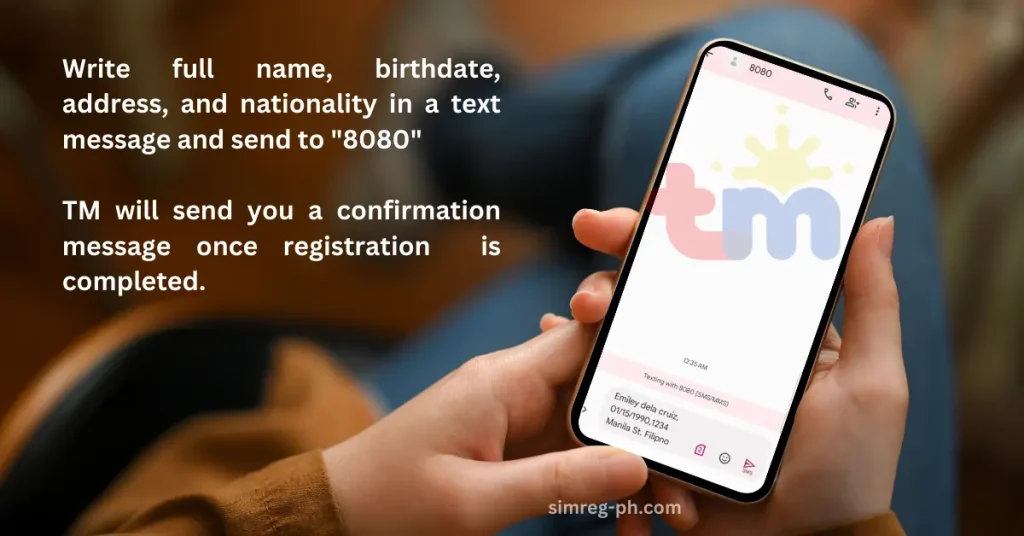
** Ensure the provided details match your valid government-issued ID.
** If the SIM registration fails, follow the instructions in the error message or contact TM’s customer support for assistance.
** Data charges will apply if SMS is sent from a roaming SIM. To save charges, you may register via the Globe One app or the Official website
Unlock Freebies After TM SIM Registration:
Upon successful registration you are eligible to claim exciting rewards. Do not miss out on this free entertainment.

5GB Free Data:
** 2GB for general internet use.
** 3GB FunALIW Pack, perfect for entertainment apps like YouTube, Facebook, and TikTok.
Rewards validity is for 3 days and you can activate by texting “FREEEZ50” to 8080.

With your registered TM SIM, step into the future of mobile technology! TM SIMs are now 5G-ready, with lightning-fast speeds on your 5G-enabled smartphone. For travelers, this feature will enhance your experience with roaming services where coverage is available.

Registered TM SIM network ensures compliance with the SIM Registration Act and provides you with enhanced protection. Registered sims shield you from:
* Spam messages & calls
* Fraudulent activities& Unwanted access
How To Check if SIM is Registered
If you are not sure whether your TM SIM card is registered successfully or not- You have multiple options to verify if your TM SIM is registered correctly.
1- Check TM registration status via official Website
- Navigate to the sim registration link: https://new.globe.com.ph/simreg and Enter your 11-digit mobile number.
- Enter the OTP that will be received on your mobile via SMS and will be valid for just 5 minutes.
- Once you enter OTP, it shows you a note on your screen: “Whoops, You SIM has been previously registered.”
- If SIM is not registered, you will be directed to the Registration page, and from there, you should register your simcard.
2- Check TM registration Via GlobeONE App:
- Open your GlobeONE app and go to the dashboard.
- Under your name and in front of your mobile, you will find a note in blue color with a tick Registered
- If SIM is not registered it will be mentioned in front of your number in yellow color: Unregistered.
So, navigate to the GlobeONE app and check if the sim is registered.
3-Check Registration Status via SMS or Call
- Type “SIMREG” into your message app.
- Send “SIMREG” to “8080” to check registration status.
- You will receive a confirmation message that your sim is registred.
You can call +264 811 500 100 to check sim card is registered.
TM SIM Promos and Plans
TM is offering affordable connectivity for all, and this is the major reason that TM has become the value brand of Globe Telecom. Here, you will find different types of data plans and promos. You will also find out how to register a plan.
Final Thoughts:
TM SIM registration is mandatory for All users, including locals, foreigners, and corporations. All subscribers must provide basic personal details and a valid government ID under the SIM Registration Act to ensure user accountability and protection against fraud, and other mobile-related crimes. Registration is simple, free, and accessible via https://new.globe.com.ph/simreg or the GlobeOne app. Failure to register results in SIM deactivation, leading to loss of access to calls, texts, and data services and legal penalties and fines. Registered TM users can avail of countless rewards. Freebies and promos at affordable rates.