How To Check Balance in Globe Fast: With Free PDF Cheat Sheet!

Stay Connected with Easy Globe Balance Checks!
If you want to maintain control on your balance usage, calls. text, and data, you must know how to check balance in Globe prepaid, postpaid, or Globe at Home WiFi, quickly from anywhere. This guide offers the fastest, easiest ways to check your balance in 2025, plus exclusive tips, tools, and hacks to save time and money. Try our interactive guide below to find the perfect method for you!
Find the Best Way to Check Your Balance
Do you have internet access?
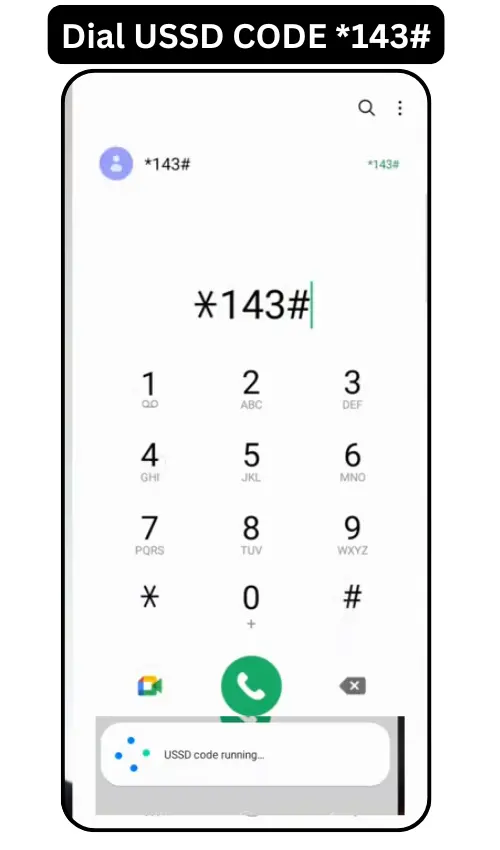
Method 1: Globe Balance Inquiry Using USSD Code (*143#)
The *143# USSD code is a free, no-internet method for prepaid and postpaid users.
Steps to Check Balance via USSD
- Dial *143# on your phone’s dial pad and press Call Button.
- Wait few seconds when USSD is running.
- Balance will pop-up on your screen.
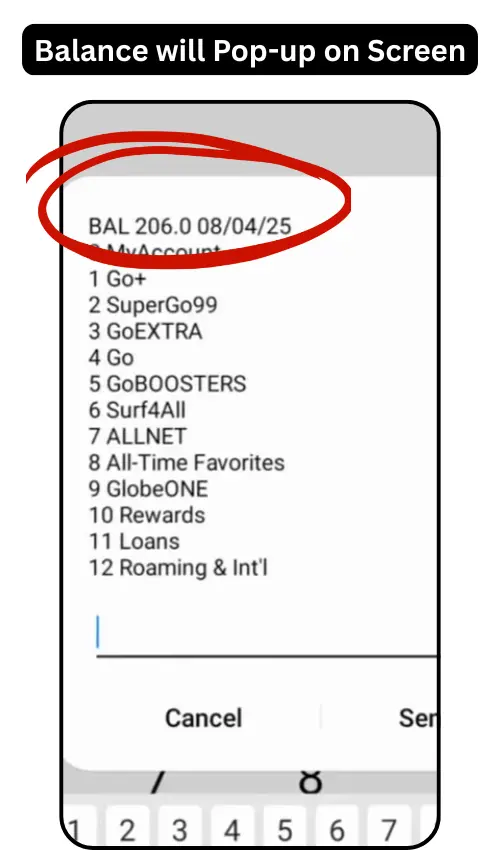
Tips for USSD
- Save *143# as “Globe Balance” in your contacts.
- For Globe Tattoo, select Tattoo Services in the menu.
- If the menu fails, check your signal or restart your phone.
How to Check Data Balance in Globe-Using USSD Code (*143#)
If you want to check Globe data balance then follow below steps:
- Open dial-pad, Dial USSD code (*143#)
- Pop-up menu will show up with various options.
- Select My Account (usually option 1),and click send.
- On next menu, select “My Data”(option 1), again click send.

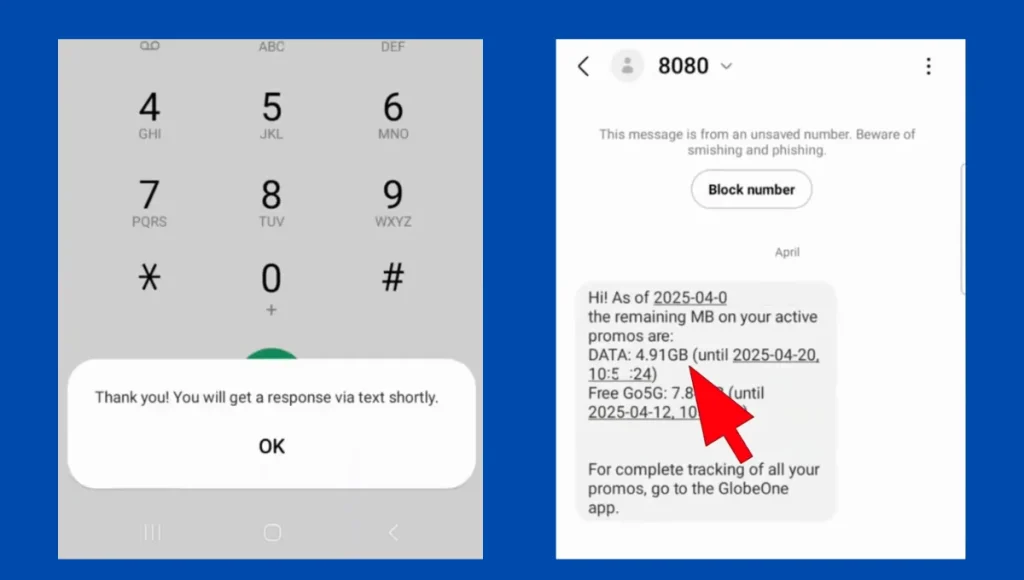
- You will see a pop up note, that data balance will be sent to you in text message.
- In few seconds, you will receive, all information of data balance along with expiry date via text message.
Method 2: Check Balance via SMS (Text to 8080)
Send text message to 8080. It is a free, quick way to check your balance without an app.
Steps to Check Balance via SMS
- Open your messaging app.
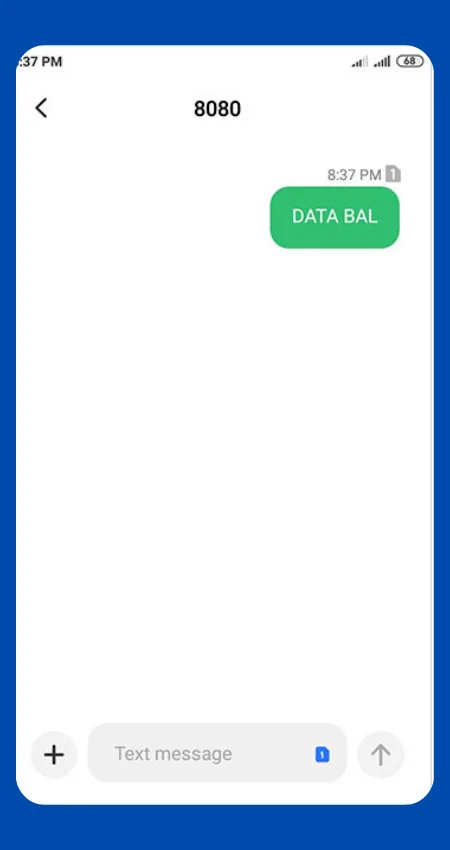
- Text DATA BAL (data balance) or BAL (load balance) to 8080.
- Wait for Globe’s reply with your balance details.
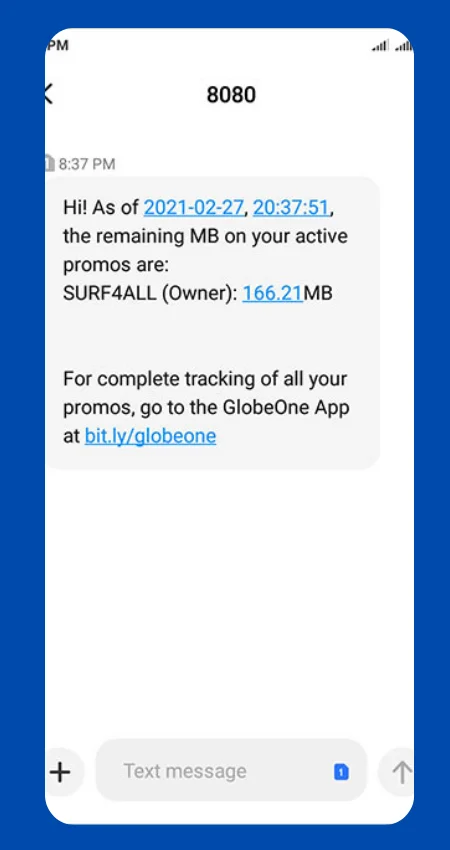
Tips for SMS
- Text BILL to 8080 for postpaid unbilled charges.
- Save 8080 as “Globe SMS” for easy access.
- No reply? Ensure you’re using a Globe SIM with signal.
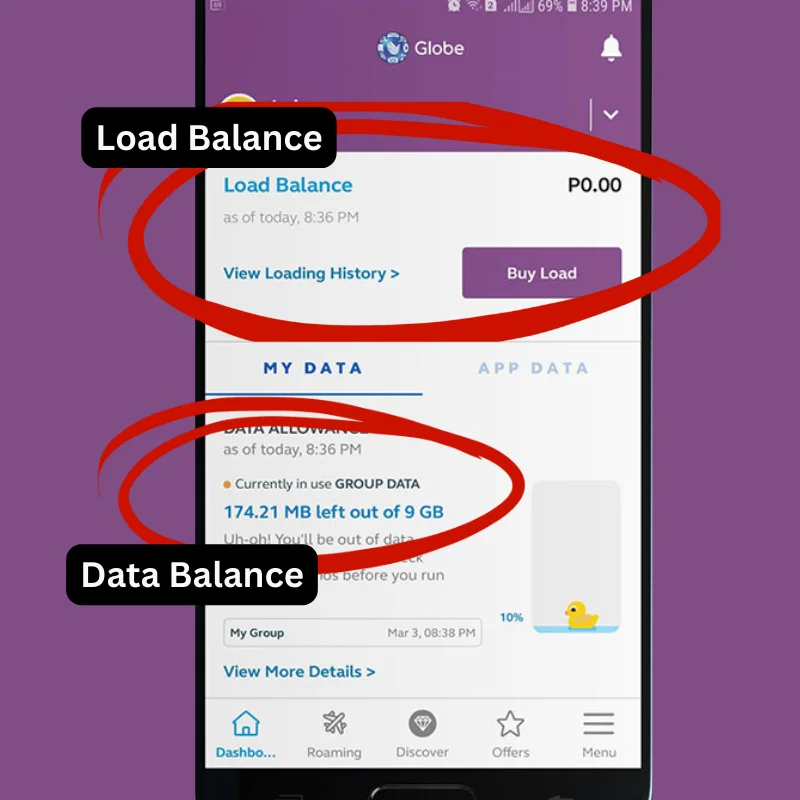
Method 3: Check Balance Using the GlobeOne App
The GlobeOne app is perfect for managing multiple accounts. for Globe balance inquiry, data balance check and tracking promos.
Steps to Check Balance via GlobeOne App
- Download GlobeOne from Google Play or App Store.
- Log in with your Globe registered number or create an account.
- View your balance, data, and promos on the dashboard.
- Switch to Globe at Home or postpaid accounts via Manage Accounts.
Tips for GlobeOne App
- Update to the latest 2025 version for accurate data.
- Login issues? Clear cache or contact 211.
Method 4: Check Globe Balance by Calling Globe Hotline (222 or 211)
Steps to Check Balance via Hotline
- Dial 222 (prepaid, free) or 211 (customer service) from your Globe number.
- Follow prompts or speak to a representative.
- Request balance details (load, data, or bill).
Tips for Hotline
- Use 222 for quick prepaid checks, 211 for postpaid or roaming.
- Have your account number ready for faster service.
Which Method Is Right for You?
[ninja_tables id=”2491″]
Automate Your Globe Balance Checks
Save time with these modern tools:
- Google Assistant/Siri: Set up a voice command (e.g., “Hey Siri, text DATA BAL to 8080”) to check your balance hands-free.
- IFTTT: Create an applet to text 8080 daily and save the reply to your email or notes. Check IFTTT setup guide].
- GlobeOne Notifications: Enable push notifications in the app for low-balance alerts.
Special Cases: Globe Tattoo, Multiple Accounts, and More
- Globe Tattoo: Dial *143#, select Tattoo Services, and enter your device number.
- Multiple Accounts: Link all accounts (prepaid, postpaid, WiFi) in GlobeOne for one-tap switching.
- Network Outages: Use *143# (offline) or message Globe’s official X account.
- Roaming: Text ROAM DATA BAL to 8080 or use GlobeOne (charges may apply).
Save Money with Smart Balance Checks
Follow below tips to maximize your Globe plan:
- Check data balance before registering for promos like GoSurf50 to avoid wasting load.
- Use GlobeOne to track promo expirations and reload on time.
- Students/OFWs: Text BAL to 8080 daily to budget for calls or data.
Download Our Free Globe Balance Cheat Sheet
Get our printable PDF with all balance-checking methods and tips.] Save it for offline reference or share with friends!
Troubleshooting Common Issues
- USSD Not Working: Restart your phone or try in a stronger signal area.
- No SMS Reply: Verify you texted 8080 from a Globe SIM.
- App Errors: Update GlobeOne, clear cache, or reinstall.
- Outdated Balance: Wait 5-10 minutes or call 211.
Frequently Asked Questions
How can I check my Globe balance without load?
*143# and texting 8080 are free and don’t require load.
How do I check my Globe at Home WiFi balance?
Use *143# (Globe at Home option), GlobeOne, or text BAL to 8080
What’s the fastest way to check data balance?
Text DATA BAL to 8080 for instant results without internet.
How do I check my balance while roaming/overseas?
Use GlobeOne or text ROAM DATA BAL to 8080 (charges may apply). You can check via GlobeOne app or Gcash as well.
Conclusion:
With *143#, SMS, GlobeOne, or the hotline, checking your Globe balance is a breeze. Download our cheat sheet, try our interactive tool, or share your favorite hack in the comments to stay connected smarter!